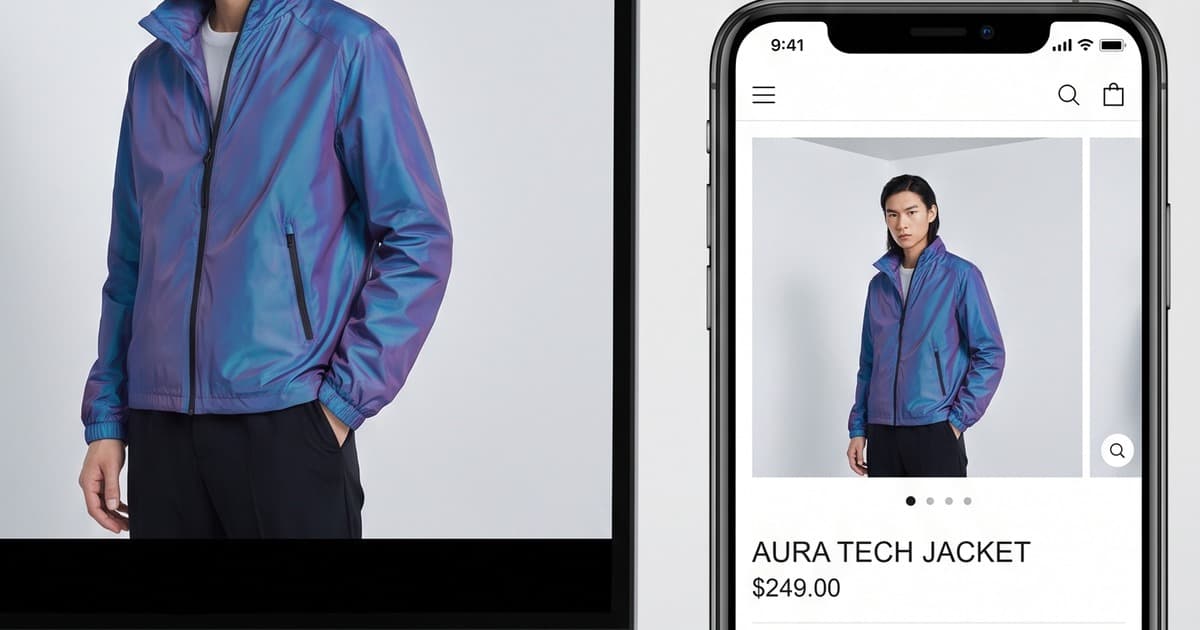
Your product page is doing most of the heavy lifting. It's where someone goes from "I'm interested" to "I'm buying" — or more often, where they quietly close the tab.
For Shopify fashion brands, the product detail page (PDP) is the highest-leverage page on the site. Traffic from ads, social, search — it all funnels here. And yet most fashion brands underinvest in PDP visuals, treating them as a box to tick rather than a conversion tool to optimize.
In 2026, the standard has changed. The brands winning on Shopify aren't just showing products — they're showing them in motion, on real-looking models, in context. And they're doing it for every SKU, not just their hero products.
This post walks you through what a high-converting fashion PDP visual stack looks like today, what the data says about each element, and how AI-generated imagery makes it achievable at scale.
Why PDP Conversion Rate Is Your #1 Lever
Before we get into visuals, a quick numbers reality check.
If your Shopify store gets 10,000 monthly visitors and converts at 1.5%, you're making 150 sales. If you improve PDP conversion from 1.5% to 2.5%, you make 250 sales — without spending a single extra dollar on traffic.
That's a 67% revenue increase from the same ad budget.
Fashion industry averages sit around 1.5–2% overall, but top-performing brands push 3–4%+ on optimized PDPs. The gap isn't usually price, shipping, or even product quality. It's visuals.
Shoppers can't touch your clothes. They can't feel the fabric, check the drape, or try it on. Every image and video you publish is a proxy for that physical experience. The better you proxy it, the more confident they feel buying.
The Visual Stack of a High-Converting Fashion PDP in 2026
There isn't one magic image that converts shoppers. It's a sequence — a stack of visual assets that answers a progression of questions a shopper has as they scroll.
Here's what the stack looks like for a fashion PDP that consistently converts:
1. On-Model Hero Image (Front)
What it answers: What does this look like on a person?
The hero image is the most important visual on the page. It's what appears in thumbnails, ad previews, and above the fold. A flat-lay or ghost mannequin as the hero image is no longer competitive for most categories.
A real-looking model — correct posture, natural styling, clear fit — communicates size, proportion, and wearability in a way no flat-lay can.
Key specs for Shopify hero images:
- Minimum 2048 × 2732px (portrait 3:4 ratio works best on mobile)
- Clean background (white, off-white, or neutral studio tone) for clarity
- Full-length or three-quarter shot to show cut and proportion
- Consistent lighting across all products in the catalog
2. Secondary Angles (3–5 Images)
What they answer: How does this look from different angles? What are the details?
- Back shot
- Side profile
- Detail close-up (fabric texture, stitching, zipper, hem, print)
- Styled shot (showing how it pairs with other pieces)
- Alternate lifestyle context (worn casually vs. dressed up)
Research from Baymard Institute consistently shows that shoppers with access to more product angles have lower return rates. They know what they're buying. Returns cost fashion brands 20–30% of revenue — every close-up shot you add is a return-prevention tool.
3. Lifestyle Context Image
What it answers: Is this for my life? Can I picture myself wearing this?
A lifestyle image — a coffee shop, a street scene, a living room — is where shoppers project themselves. It contextualizes the product beyond the garment and activates aspiration.
For Shopify fashion, lifestyle images often perform best as the second or third image in the gallery. Let the hero establish the product clearly, then let lifestyle imagery create emotional connection.
4. Short Video Clip (6–15 Seconds)
What it answers: How does this move? What's the drape and fit actually like?
This is the fastest-growing element of the fashion PDP stack — and the most underutilized.
A short model video showing the garment in natural movement (walking, turning, light movement) answers questions that no still image can:
- How does the fabric drape and flow?
- Does it look stiff or soft?
- How fitted is it really?
- How does it move at the hem, sleeve, or collar?
Brands adding on-model video clips to their Shopify PDPs typically report:
- 10–30% increase in add-to-cart rate
- Meaningful reduction in return rates (customers have more realistic expectations)
- Increased time on page (which correlates with purchase intent)
The challenge has always been production cost. You can't realistically film model videos for every SKU in a 200-piece collection. Until now.
The Math Problem Traditional Production Can't Solve
Here's the honest constraint of traditional fashion photography and video:
- A professional model shoot costs €1,500–€5,000 per day
- A photographer/videographer day rate adds €500–€1,500
- You might get 30–60 complete product setups per day (images + video)
- Post-production: another €500–€2,000 per day of shoot
For a 200-SKU catalog with full visual stacks (5 images + 1 video each), you're looking at 3–4 shoot days, €15,000–€30,000+, and a 4–8 week production timeline.
Most Shopify fashion brands — especially those under €5M annual revenue — simply can't do this. They default to flat-lays, inconsistent images, or incomplete stacks. And then wonder why their conversion rate is stuck.
The math doesn't work. AI changes the math.
How AI Visuals Solve the Shopify PDP Scale Problem
AI-generated on-model imagery and video generation have crossed a threshold in 2026. The output quality is realistic enough for PDPs, social, and ads. More importantly, the economics are fundamentally different.
With a platform like Tellos AI Photo Studio, the workflow looks like this:
- Photograph flat-lays at home or in a minimal setup — consistent lighting, clean background
- Upload to Tellos — select AI model, background, styling context
- Generate the full visual stack — hero image, secondary angles, lifestyle shots, short model video
- Download production-ready assets — sized and formatted for Shopify
What would take 4 shoot days takes an afternoon. What costs €20,000 costs a fraction. And critically: you can do this for every single SKU, not just your top sellers.
Consistency Across the Catalog
One underappreciated benefit of AI-generated imagery is consistency. In a traditional multi-day shoot, you'll get slight variations in lighting, model expression, background tone, and styling across days. That inconsistency is invisible to the team — they're in the studio, they see the continuity. But shoppers browsing your catalog notice it immediately.
AI-generated imagery uses the same lighting parameters, the same model appearance, and the same background settings across 200 SKUs. Every product page looks like it belongs to the same brand. That professionalism lifts trust, and trust lifts conversion.
Step-by-Step: Auditing and Upgrading Your Shopify PDP Visuals
Here's a practical audit framework to identify where you're losing conversions on PDPs today.
Step 1: Export Your PDP Conversion Data
In Shopify Analytics (or GA4 connected to your store), find your product page conversion rate broken down by product. Sort by:
- Traffic volume (high traffic, low conversion = highest opportunity)
- Category (do certain categories convert worse? Often a visual problem)
- Hero image type (do products with model shots outperform flat-lays?)
Even a quick sort often reveals the pattern: products with on-model images convert meaningfully higher than those with flat-lays or ghost mannequins.
Step 2: Score Your Current Visual Stack
For your top 20 traffic products, score the visual stack:
| Element | Present? | Quality (1–5) |
|---|---|---|
| On-model hero image | ✅/❌ | |
| 3+ secondary angles | ✅/❌ | |
| Detail close-up | ✅/❌ | |
| Lifestyle context | ✅/❌ | |
| Video clip | ✅/❌ |
Products with low scores on high-traffic pages are your first optimization priority.
Step 3: Prioritize by Revenue Impact
Focus on:
- High traffic + low conversion — any improvement has maximum impact
- High AOV products — luxury or premium pieces where buyers need more confidence
- High return-rate products — often means shoppers are surprised by what arrives; better visuals set accurate expectations
Step 4: Generate the Missing Assets
For each priority product, identify the gap. Missing on-model hero? Missing video? Missing lifestyle context? Use AI generation to fill the stack efficiently — starting with the assets that have the highest conversion impact.
The order of impact (generally):
- On-model hero image (if currently flat-lay)
- Short model video
- Lifestyle context
- Additional angles and close-ups
Implementation: Shopify Theme Compatibility and Technical Notes
Getting AI-generated assets live on your Shopify PDPs is straightforward. A few technical notes:
File Formats and Sizes
- Images: JPEG at 85–92% quality, 2048px on the longest side
- Video: MP4 (H.264), max 50MB for Shopify native hosting, 1080p resolution
- Shopify auto-compresses images — upload at full resolution and let it handle the optimization
Theme Compatibility
Most modern Shopify themes (Dawn, Impulse, Prestige, Symmetry, Turbo) support:
- Multiple product images with gallery/slider
- Video in the product media gallery (Shopify's native
<video>or YouTube/Vimeo embeds) - Lazy loading (important for page speed)
If your theme doesn't support video in the product gallery natively, apps like Tolstoy, Videowise, or ReelUp add video to PDPs with minimal theme changes.
Page Speed Considerations
Visuals are the main culprit in slow Shopify PDP load times. Mitigation:
- Use Shopify's CDN (automatic for images uploaded through admin)
- Keep video clips under 15 seconds and 30MB where possible
- Use
loading="lazy"for secondary images - Shopify's built-in image optimization handles WebP conversion automatically
Mobile-First Layout
Over 70% of Shopify fashion traffic is mobile. Test every visual at 390px width. Vertical 3:4 images fill the screen beautifully on mobile. Wide landscape shots often get cropped awkwardly on smaller viewports.
For video, auto-playing muted loops perform better than click-to-play on mobile — but check your theme's implementation.
Related Visuals That Lift PDP Performance
Beyond the core stack, these additional assets consistently improve PDP metrics:
Size and Fit Callouts
Pair your on-model images with model stats ("Model is 175cm, wearing size M"). This anchors the fit context and dramatically reduces "will this fit me?" hesitation. It's one of the most underutilized tactics in Shopify fashion.
Color Variant Consistency
If you sell a blouse in 8 colors, all 8 variants should have on-model images with consistent styling. Shoppers switching between variants are comparing — if some variants have model shots and others have flat-lays, trust erodes and you often lose the sale.
AI makes this economical. Photographing all your color variants with AI is now a matter of minutes, not additional shoot days.
Editorial Lifestyle Imagery
For brand-positioning purposes (and for Instagram/Pinterest traffic landing on PDPs), an editorial lifestyle image in the gallery reinforces that you're not just a product but a brand with an aesthetic. See our guide on AI editorial photography for fashion for how to create magazine-quality shots without a crew.
A/B Testing Your PDP Visuals
Once you've upgraded your visual stack, test systematically:
What to Test
- Hero image type: On-model (full length) vs. on-model (three-quarter) vs. lifestyle as hero
- Video placement: First in gallery vs. third vs. as a separate tab
- Model diversity: Does showing multiple body types on variant selectors lift conversion for your audience?
- Background: Pure white vs. neutral toned vs. minimal lifestyle backdrop
How to Test on Shopify
- Shopify Markets / native A/B: Limited — better with third-party tools
- Convert.com or VWO: Full-featured, expensive, worth it for larger stores
- Google Optimize alternative: Since Google Optimize sunset, most brands use AB Tasty or Optimizely
- Simpler approach: Run one version for 2 weeks, switch, compare conversion rates (control for seasonality)
Don't test too many things at once. One variable at a time gives you interpretable results.
The Competitive Reality in 2026
Here's the uncomfortable truth for fashion brands still running flat-lays as hero images on all PDPs:
Your competitors who've invested in AI-generated on-model imagery are converting at 2–3× your rate on the same traffic. They're getting more add-to-carts, fewer returns, and better ROAS on the same ad spend — because their product pages do more of the selling.
The cost barrier that used to justify "we'll get to PDP improvement later" no longer exists. AI has removed it. What used to cost €20,000 and 6 weeks now costs a fraction and takes a day.
The brands that will win the next phase of Shopify fashion aren't those spending the most on ads. They're spending on conversion — making sure every visitor who lands on a PDP has the best possible chance of buying.
That starts with the visual stack.
Checklist: High-Converting Fashion PDP Visual Stack
Before you close this tab, here's your practical checklist:
Core stack:
- On-model hero image (clean background, full or three-quarter length)
- Back shot + side shot
- Detail/texture close-up
- Lifestyle context image
- Short model video (6–15 sec, natural movement)
Optimization:
- Model stats listed (height, size worn)
- All color variants have on-model images
- Mobile-tested (all images look right at 390px)
- Video is auto-play, muted, loop on mobile
Technical:
- Images uploaded at 2048px+
- Videos under 50MB
- No broken or placeholder images
- Page speed score above 70 on mobile (Lighthouse)
How Tellos Helps Shopify Fashion Brands Fill the Stack
Tellos AI Video Studio was built specifically for the problem described in this post — high-quality visual content at catalog scale, without the production overhead.
Upload your flat-lays, select AI models and scenes, and generate the complete PDP visual stack: on-model hero images, secondary angles, lifestyle shots, and short model video clips. Output is production-ready for Shopify — correct format, correct resolution, correct aspect ratios.
You can do it for your hero products, then roll it out across the full catalog as you see the conversion lift. Brands using Tellos consistently report measurable improvements in add-to-cart rate and return reduction within the first month.
Ready to upgrade your Shopify product pages? Start with Tellos — your PDPs (and your conversion rate) will thank you.