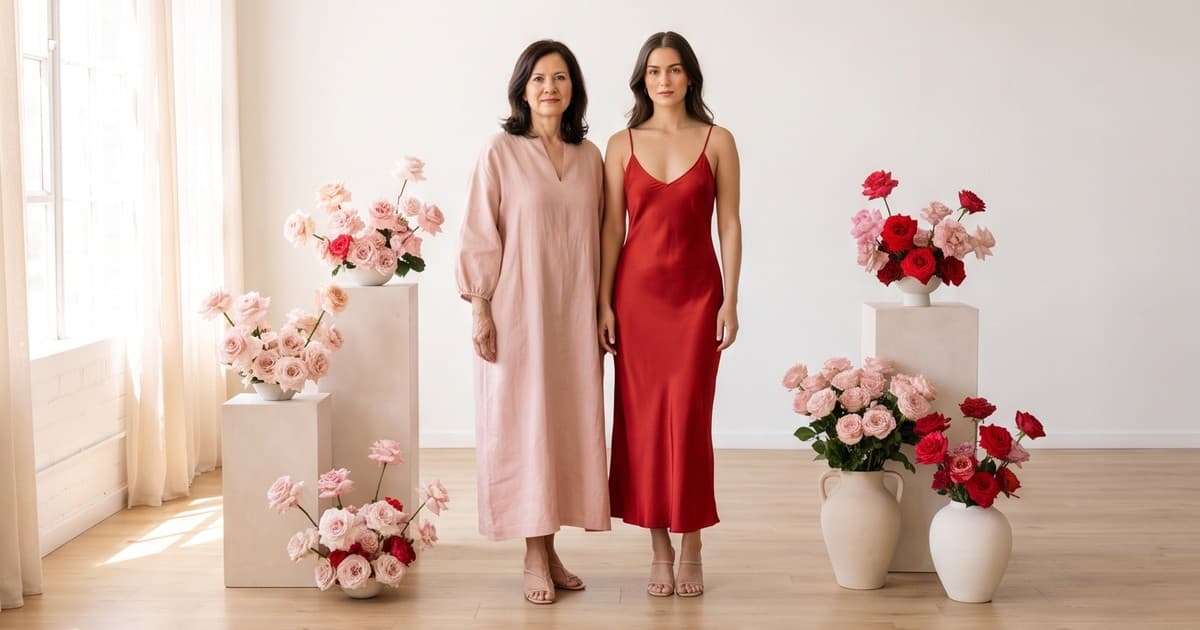
Valentine's Day 2026 hit a record $29.1 billion in projected US spending, with $3.5 billion on clothing and $7 billion on jewelry, according to the National Retail Federation. Mother's Day went even bigger: a record $38 billion, an average of $284.25 per shopper, and 51% of celebrants planning to buy clothing or accessories.
Those are two of the biggest gifting moments on a fashion brand's calendar, and they land in the same five-month window. Yet most brands treat them as afterthoughts to Q4. The creative team is exhausted from Black Friday, the January shoot budget is gone, and the "Valentine's campaign" ends up being last year's product photos with a red banner on top.
This playbook is for the operator who wants to do it properly in 2027 without booking two extra photoshoots. We will cover the calendar, the content each holiday actually needs, how to produce it with AI photos and video, and how to test and reuse it so one production cycle covers both moments.
Why Valentine's Day and Mother's Day Deserve Their Own Creative
It is tempting to run a generic "gifts for her" campaign and call it done. The data says that leaves money on the table.
The buyer is not the wearer
For both holidays, the person clicking "add to cart" is usually not the person who will wear the product. That changes everything about the creative:
- Gift buyers are unsure about size, fit, and taste. They need visuals that answer "will she like this?" and "will it fit?" faster than a self-shopper does.
- They shop by recipient, not by category. "Gifts for mom," "gifts for my girlfriend," "gifts for my wife" are the mental filters, not "midi dresses."
- They are deadline-driven. Shipping cut-offs matter more than discounts in the final week.
The emotional register is different for each
| Valentine's Day | Mother's Day | |
|---|---|---|
| Core emotion | Romance, desire, confidence | Gratitude, warmth, family |
| Top fashion categories | Lingerie, sleepwear, date-night dresses, jewelry | Loungewear, knitwear, scarves, jewelry, easy dresses |
| Visual mood | Evening light, reds and deep pinks, intimate settings | Daylight, soft pastels, home and brunch settings |
| Model casting | Couples, solo confident looks | Multi-generational, mothers of different ages |
| 2026 US spend (NRF) | $29.1B total, $3.5B clothing | $38B total, 51% buying clothing or accessories |
One generic shoot cannot hit both moods convincingly. That is exactly why these holidays have historically been under-served: two distinct campaigns used to mean two distinct shoots.
Shoppers want something different
NRF's Mother's Day survey found that 46% of shoppers say finding something unique or different is the most important factor when buying a gift, followed by creating a special memory (39%). Your same-as-always product grid does not say "unique." Fresh, holiday-specific creative does.
The 2027 Calendar: Work Backwards From the Holiday
Valentine's Day 2027 falls on Sunday, February 14. Mother's Day (US) 2027 is Sunday, May 9. UK Mothering Sunday is March 7, 2027, which matters if you sell into the UK.
Here is a backwards-planned timeline that fits a lean team.
Valentine's Day timeline
- Early December: Lock the Valentine's product edit (10-30 SKUs). Decide hero products and gift price tiers.
- Mid December: Brief creative. With AI production, this is when you generate the on-model photos and video, not mid-January.
- First week of January: Gift guide pages live on site. Email list segments built.
- January 15-25: Paid social testing starts. This is when you find the winning creative, not February 10.
- February 1-10: Scale winners. Push shipping deadline messaging hard.
- February 11-14: Pivot to gift cards, local pickup, and "self-gifting" angles.
Mother's Day timeline
- Late February: Lock the Mother's Day edit. Reuse Valentine's learnings on which price tiers converted.
- Early March: Produce creative. UK brands need this done by mid-February for Mothering Sunday.
- Late March: Gift guides live, email segments ready.
- April 1-20: Testing phase on paid social.
- April 20-May 5: Scale and push shipping cut-offs.
- May 6-9: Gift cards, experiences, last-minute angles.
If you already planned Q4 with a structured calendar, this will feel familiar. Our Black Friday and Cyber Monday content calendar uses the same backwards-planning logic.
The Content Each Holiday Actually Needs
Before you produce anything, build a shot list per channel. Here is what a full campaign needs for a 20-SKU edit.
Product page and collection assets
- On-model photos in holiday styling for each hero SKU (3-5 angles)
- Short on-model video (5-10 seconds) for each hero SKU, showing drape and movement
- Gift-context images: product styled with wrapping, flowers, a breakfast tray, a dinner table
- Collection banner for the gift guide landing page
Product video on the PDP is not a nice-to-have for gift buyers. When the buyer cannot try the product on, motion is the closest substitute. See our breakdown of product video and conversion rate in ecommerce for the numbers.
Paid social assets
- 10-20 ad variants per holiday across hooks, models, and settings
- 9:16 vertical video for Reels, TikTok, and Stories
- 4:5 static images for feed placements
- Recipient-specific variants: "for her," "for mom," "for your wife," "for yourself"
Email and SMS assets
- Gift guide hero image per price tier (under $50, under $100, luxury)
- Animated GIF or short video thumbnail for the launch email
- Shipping deadline creative that you can swap in fast
Organic social
- Behind-the-gift stories: styling ideas, "how she'd wear it"
- Pinterest-ready vertical images (Pinterest search for gift ideas starts weeks before both holidays)
That is easily 80-150 distinct assets per holiday. With a traditional shoot, you are looking at a full studio day, models, a stylist, props, and two to three weeks of post-production. Doing that twice in five months is where most brands give up.
How AI Production Changes the Math
Here is the core shift: you don't need a new physical shoot to get new holiday creative. If you already have flat lays, ghost mannequin shots, or past on-model images of your products, an AI fashion studio can place those exact garments on models, in new settings, with new lighting and mood.
What the workflow looks like
- Upload existing product images. Flat lays, ghost mannequin, or old on-model photos all work as inputs.
- Pick models and casting. For Mother's Day, that means mothers across different ages, and mother-daughter pairs. For Valentine's, solo looks and couples.
- Set the scene. Valentine's: candlelit dinner, evening city street, hotel suite. Mother's Day: sunny kitchen, garden brunch, cozy living room.
- Generate photos, then animate the best ones into short videos. Tellos turns approved product photos into on-model video with natural fabric movement.
- Export in every aspect ratio for PDP, feed, Stories, and email.
Under the hood, AI fashion platforms build on advanced image and video models. Tools like Tellos add the fashion-specific layer: garment accuracy, consistent models across a catalog, brand-safe styling, and production at catalog scale. We covered how that layer works in AI fashion photoshoots without a shoot.
Cost and speed comparison
| Traditional holiday shoot | AI production | |
|---|---|---|
| Lead time | 3-6 weeks (booking, shoot, retouching) | Days |
| Cost per holiday | $8,000-$30,000+ for a mid-size edit | A fraction, based on asset volume |
| Casting range | Limited to who you book that day | Any age, body type, or pairing |
| Scene variety | 1-3 sets per shoot day | Unlimited settings |
| Late SKU additions | Reshoot or skip | Add in hours |
| Reuse for second holiday | New shoot needed | Same garments, new scenes |
The last row is the big one. Valentine's and Mother's Day can share one product input pipeline. You digitize the garments once, then generate two completely different emotional campaigns from them.
For a deeper cost breakdown, read fashion photography cost in 2026: traditional vs AI.
Valentine's Day Campaign: Creative Direction That Converts
Hero concepts to brief
- "Date night ready": dresses, heels, and jewelry on a model in warm evening light, city street or restaurant setting
- "Treat yourself": Galentine's and self-gifting angles, now a large share of Valentine's shoppers
- "Cozy in": matching loungewear and sleepwear sets in a soft-lit bedroom or living room
- "The gift box": product styled in packaging with ribbon and roses, for gift-buyer reassurance
Casting tips
- Show solo confident looks as well as couples. Many buyers are self-gifting.
- Show a range of body types for lingerie and sleepwear. Gift buyers often guess sizes, and seeing the product on a body like their partner's reduces anxiety. Our guide to size-inclusive fashion photography with AI covers this in detail.
Color and product variants
Valentine's often means pushing red, pink, and black colorways. If a dress comes in eight colors, AI lets you show the red version in a dinner scene without shooting all eight. See product color variant photography with AI.
Jewelry and accessories
Jewelry is the top Valentine's category by dollars spent for the 10th straight year. If you sell accessories, pair them with apparel in every shot. That raises average order value and gives gift buyers a complete look. We wrote a full guide on AI content for jewelry and accessories ecommerce.
Mother's Day Campaign: Creative Direction That Converts
Hero concepts to brief
- "Sunday morning": knitwear, loungewear, and robes in a sunny kitchen or breakfast-in-bed scene
- "Brunch ready": easy dresses, blouses, and light layers in a garden or café setting
- "Mother and daughter": matching or coordinated looks on multi-generational pairs
- "For every mom": mothers in their 30s, 50s, and 70s wearing the same piece, styled for each
Why casting matters more here
The Mother's Day buyer is shopping for a specific person: their mother, their wife, their daughter. NRF found 54% buy for a mother or stepmother, 22% for a wife, and 13% for a daughter. A 25-year-old model in every image does not help a 30-year-old picture a gift for her 60-year-old mom.
AI casting removes the constraint. You can show the same cardigan on a 35-year-old new mom and a 65-year-old grandmother without a second booking. Read more in AI model casting for fashion lookbooks and catalogs.
Product focus
- Comfort categories (knitwear, loungewear, pajama sets) consistently perform for Mother's Day
- Accessories (scarves, bags, jewelry) are safe-size gifts, so feature them prominently for buyers who are unsure about fit
- Bundles: style a full look and sell it as a gift set
Paid Social: Test Fast, Then Scale
Paid social is where most holiday budgets go, and it is where AI creative pays off most.
Build a test matrix
For each holiday, plan a matrix of variants rather than a single ad:
| Variable | Valentine's options | Mother's Day options |
|---|---|---|
| Hook | "She'll actually wear it," "Date night, sorted," "Treat yourself" | "For the mom who has everything," "Brunch-ready," "Shipping ends May 5" |
| Model | Solo, couple, different body types | Different ages, mother-daughter |
| Setting | Restaurant, bedroom, city night | Kitchen, garden, living room |
| Format | 9:16 video, 4:5 static, carousel | 9:16 video, 4:5 static, carousel |
Three hooks times three models times two settings is 18 variants from a single product. With AI production, that is an afternoon of work, not a reshoot. Our guide to testing 20 AI creative variants on Meta ads walks through structuring the test.
Nail the first three seconds
Gift buyers scroll fast. Open video ads with the product on a model in motion, then show the recipient context. Avoid slow logo intros. More tactics in AI video hooks for fashion ads: the first 3 seconds.
Platform fit
- TikTok and Reels: short try-on style videos, "gift reveal" formats, styling ideas
- Pinterest: vertical gift-guide imagery, searchable weeks ahead of each holiday
- Meta feed: 4:5 statics with clear price and shipping deadline
If you're deciding where to put budget, our comparison of TikTok Shop vs Instagram Shop for AI fashion video breaks down which formats perform where.
Gift Guide Pages: The Overlooked SEO Opportunity
Every year, searches like "valentine's day gifts for her," "mother's day gift ideas," and "gifts for mom clothing" spike weeks before each holiday. Most fashion brands send that traffic to a generic collection page.
Build dedicated gift guide landing pages
- One URL per holiday that stays live year to year (for example,
/collections/mothers-day-gifts). Reusing the URL lets it build authority over multiple seasons instead of starting from zero each year. - Segment by recipient and price: "Gifts for mom under $75," "Valentine's gifts for her under $100."
- Use holiday-specific imagery, not your standard product grid. Fresh scenes signal relevance to shoppers and can earn image search traffic.
- Add short product video on the collection page itself. Our setup guide for shoppable video galleries on Shopify collection pages shows how.
- Mark up product videos with schema so they can appear in video results. See product video schema markup for fashion ecommerce.
Publish the page early
Search engines need time to crawl and rank a page. Publish Valentine's gift guides by early January and Mother's Day guides by late March. Then refresh the imagery each year while keeping the URL.
Email: The Highest-ROI Channel for Gift Buyers
Your email list already trusts you. For holiday gifting, that trust converts.
A simple four-email sequence per holiday
- Gift guide launch (3-4 weeks out): hero video thumbnail, three price tiers, recipient segments
- Best sellers and styling (2 weeks out): on-model images showing how she'll wear it
- Shipping deadline (5-7 days out): urgency plus your top 6 gifts
- Last chance and gift cards (1-2 days out): digital gift card plus a "self-gift" angle
Animated product video in email consistently draws more clicks than static images. See AI video email marketing for fashion for examples and tooling.
Reduce Gift Returns With Better Visuals
Gifts get returned more than self-purchases, and the main reason is fit or "not her style." Holiday creative can reduce that:
- Show the product on multiple body types so the buyer can match it to the recipient
- Use video to show fabric drape, stretch, and true color
- Include clear size guidance near the gift guide imagery
- Show styling context so the buyer can judge whether it matches the recipient's taste
We cover the full return-reduction approach in reducing fashion returns with better product visuals.
A One-Pipeline Plan for Both Holidays
Here is how a lean team can run both campaigns from one production pipeline:
- December: Digitize the combined Valentine's and Mother's Day edit (flat lays or ghost mannequin for every SKU).
- December: Generate Valentine's creative: evening scenes, couples, reds and pinks.
- January-February: Run Valentine's. Track which SKUs, price tiers, and hooks win.
- Late February: Generate Mother's Day creative from the same product inputs: daylight scenes, multi-generational casting, pastels.
- March-May: Run Mother's Day, leading with the products and price tiers that won in February.
- After May: Archive everything. Next year, refresh scenes and models and reuse the gift guide URLs.
One product digitization, two complete campaigns, no extra shoot days. That is the operating model AI production makes possible.
Quick Checklist
- Valentine's edit locked by early December, Mother's Day edit by late February
- On-model photos and short video for every hero SKU, in holiday-specific scenes
- Casting matched to the recipient: solo and couples for Valentine's, multiple ages for Mother's Day
- 15-20 paid social variants per holiday, testing hooks, models, and settings
- Evergreen gift guide URLs published 5-6 weeks before each holiday
- Four-email sequence with shipping deadline creative ready to swap in
- Multiple body types and video on gift products to reduce returns
Ready to Build Your Holiday Campaigns?
Valentine's Day and Mother's Day are two record-spending holidays sitting right after your busiest season. You don't need two more photoshoots to win them. You need fast, flexible creative that speaks to each holiday's buyer.
Tellos turns your existing product images into on-model photos and videos in any scene, with any casting, in days instead of weeks. Plan both campaigns from one product pipeline and spend your budget on testing and distribution instead of studio days.
Start creating holiday campaign content with the Tellos AI Video Studio