76% of online shoppers prefer to buy products with information in their own language, and 40% will not buy from websites in other languages at all. That's from CSA Research's survey of 8,709 consumers across 29 countries. Most fashion brands read that stat, translate their product descriptions, switch on local currencies, and call it localization.
Then they ship the exact same imagery to every market. The same model, the same Brooklyn rooftop, the same July light, whether the shopper is in Stockholm in February or Sydney in December.
Translation tells a shopper "this page is for you." The imagery is what convinces her. If the product page in Japan shows a styling context that feels foreign, or the German store runs a summer campaign while it's sleeting outside, the translated copy is doing all the work alone.
This guide is for the person who runs ecommerce or content ops at a fashion brand selling into more than one country. It covers what to actually localize in your visuals, what to keep global, how AI changes the economics, and a workflow you can run for every drop.
Why Visual Localization Used to Be Off the Table
For most brands, localized imagery was never a real option. The math didn't work.
A traditional shoot for one collection already means booking models, a photographer, a stylist, a location, and post-production. Doing that once per market meant multiplying the cost and the calendar by the number of regions you sell in. Only the largest global retailers could justify it, and even they usually limited it to hero campaigns, not product pages.
So the default became one global shoot, cropped for every channel. That's a reasonable compromise when the alternative is five shoots. It's a much weaker compromise when generating a market-specific variant of an existing shot takes minutes instead of a plane ticket.
What changed
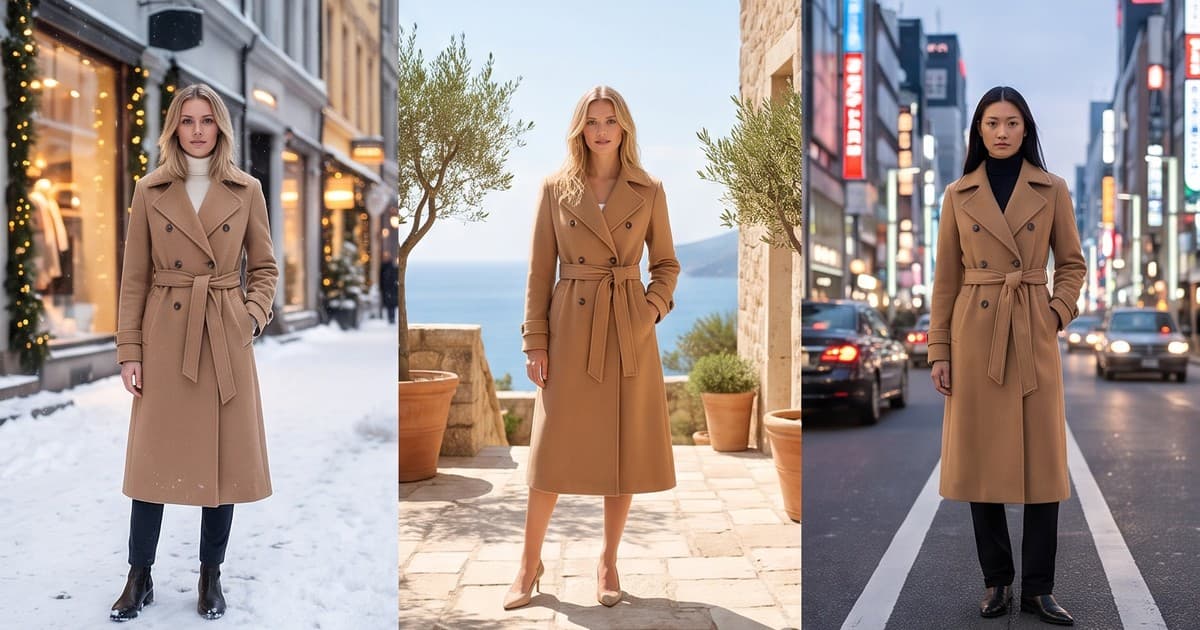
AI production tools now let you take a single product (a flat-lay, a ghost mannequin shot, or an existing on-model photo) and generate it:
- On different models, with control over age range, body type, and appearance
- In different settings, from a Paris street to a Seoul cafe to a neutral studio
- In different seasons and light, so the same coat can appear in snow or in autumn sun
- With different styling, like layering for cold markets or lighter pairings for warm ones
The garment stays the same. The context around it changes per market. That's the core of visual localization, and it's now a content ops decision rather than a budget fight.
What to Localize (and What to Keep Global)
Not everything should change between markets. Localize too much and your brand fragments into five different-looking stores. Localize too little and you're back to one-size-fits-all imagery.
Here's a practical split:
| Element | Localize per market? | Why |
|---|---|---|
| Garment, color, fit | Never | Accuracy is non-negotiable. The product must look identical everywhere. |
| Brand look (lighting style, grading, framing) | Keep global | This is your visual identity. Consistency builds recognition. |
| Model casting | Yes, often | Shoppers respond to people they can picture themselves as. |
| Backgrounds and settings | Yes | Local streets, interiors, and landscapes make the page feel native. |
| Season and weather | Yes, critical for hemispheres | Southern hemisphere markets run opposite seasons. |
| Styling and layering | Sometimes | Cold markets layer differently. Some markets style more modestly. |
| Holiday and campaign moments | Yes | Singles' Day, Diwali, Ramadan, and Black Friday don't overlap. |
| Text overlays and badges | Yes | Always local language, local sizing, local currency. |
The non-negotiable: garment accuracy
Every localization decision sits on top of one rule: the product cannot change. If the AI version of your linen shirt in the Australian store has a slightly different collar than the one in the UK store, you've created a returns problem and a trust problem at the same time.
Before you scale any market variant, compare it side by side against the master product image. Check:
- Color under the new lighting (warm sunset scenes can shift a cream to a yellow)
- Pattern scale and placement
- Trims, hardware, and logos
- Length and fit on the new model
We covered this in more depth in our guide to AI-generated clothing photo accuracy. It matters even more in multi-market work because one inaccurate master can propagate across every region.
Localizing Models: Casting for Each Market
Model casting is the most visible localization lever, and the one that needs the most care.
Start from your actual customer data
Don't guess what a "French shopper" or a "Korean shopper" looks like. Pull your own data:
- Who buys in each market (age bands, size distribution)
- Which sizes sell most in each region (size curves often differ a lot by country)
- Which product categories over-index per market
If your size curve in one market skews larger, showing only sample-size models there is a missed opportunity. Our post on size-inclusive fashion photography with AI covers how to show the same garment across body types without a separate shoot for each.
Build a small, recurring cast per market
Shoppers notice when every image shows a different face. It reads as stock, not brand. A better approach:
- Define 2 to 4 recurring AI models per market that reflect your customer base there
- Reuse them across drops so returning shoppers see familiar faces
- Keep one or two "global" faces that appear in every market for hero campaigns
This mirrors how big retailers work with regional talent while keeping a global ambassador. The difference is you can do it without a casting agency in every city. For more on this, see AI model casting for lookbooks and catalogs.
Avoid stereotypes
Localization is not caricature. Putting every model in the Japan store in front of a temple, or every model in the Italy store holding an espresso, makes the page feel like a tourist brochure. Aim for how locals actually dress and live, not how outsiders imagine them:
- Contemporary city streets, not landmarks
- Everyday interiors (apartments, cafes, offices) that feel current
- Styling that matches what's worn there now, not a cliche
If you have team members, retail partners, or customers in that market, run a few variants past them before rolling out a full catalog.
Localizing Backgrounds and Settings
Backgrounds are the cheapest localization win. They change the feel of a page without touching the product or the model.
Three levels of background localization
Level 1: Neutral studio everywhere. Clean, consistent, zero risk. Good for core PDP images, especially for marketplaces with strict white or light-gray background rules.
Level 2: Regional lifestyle settings. Same studio hero shot globally, plus 1 or 2 lifestyle images per product set in recognizable but generic local environments. A Nordic minimalist interior, a Mediterranean terrace, a dense Asian city street.
Level 3: Fully localized campaigns. Market-specific hero banners, social content, and lookbooks with local settings, local seasons, and local casting. Best for priority markets and key launches.
Most brands should run Level 1 for every product, Level 2 for bestsellers, and Level 3 only for their top two or three markets. That keeps volume manageable while putting localized content where it earns the most.
Settings that travel well vs settings that don't
| Travels well across markets | Needs a local version |
|---|---|
| Plain studio sweeps | Recognizable city streets |
| Abstract textured walls | Beaches and pools (season-dependent) |
| Neutral modern interiors | Snow and winter scenes |
| Soft natural light outdoors with no landmarks | Holiday decor |
The Hemisphere Problem: Seasonal Localization
This is the one most brands miss entirely. If you sell into both the Northern and Southern hemispheres, your seasons are six months apart.
When your US and European stores launch autumn/winter in September, Australia, New Zealand, South Africa, and much of South America are heading into spring. Running a knitwear-in-falling-leaves homepage there is not just off-brand, it's confusing.
A simple seasonal content matrix
| Month | Northern hemisphere focus | Southern hemisphere focus |
|---|---|---|
| March to May | Spring transition, light layers | Autumn, first knitwear |
| June to August | Summer, swim, linen | Winter, coats, layering |
| September to November | Autumn, outerwear, holiday prep | Spring, florals, light layers |
| December to February | Winter, holiday, sale | Summer, swim, holiday travel |
With AI, you don't need a separate shoot for each hemisphere. You can take the same trench coat and generate it in a crisp autumn street for the UK store and a breezy spring setting for the Australian store, styled lighter, in the same week.
Even if your product assortment is the same everywhere, your hero imagery and campaign content should follow the local season. Plan for this in your content calendar from the start, not as a scramble after launch.
Local Moments and Campaign Calendars
Global brands often build a single campaign calendar around Western retail moments. But shopping peaks vary a lot by market:
- Singles' Day (11.11) in China and increasingly across Asia
- Diwali in India and South Asian diaspora markets
- Ramadan and Eid across the Middle East, North Africa, and Southeast Asia
- Lunar New Year across East and Southeast Asia
- Black Friday and Cyber Monday in North America, the UK, and much of Europe
- Click Frenzy and EOFY sales in Australia
Each of these calls for different styling, color palettes, and sometimes different modesty norms. For example, Ramadan and Eid campaigns often call for longer hemlines, covered shoulders, and evening settings, while a Lunar New Year campaign might lean on red and gold styling.
AI makes it realistic to produce a short, dedicated set of visuals for each moment instead of reusing your Black Friday creative everywhere. Produce 5 to 10 hero images and a few short videos per moment per market, and reuse them across homepage, email, paid social, and marketplace storefronts.
A Practical Workflow for Multi-Market Visual Content
Here's a repeatable process you can run for every drop.
Step 1: Shoot or source one clean master per product
Everything starts with an accurate master: a flat-lay, a ghost mannequin, or a clean studio on-model shot. This is your source of truth for color, fit, and details. If you don't have one yet, our post on turning flat-lays into on-model photos walks through it.
Step 2: Generate the global core set
From the master, generate your global PDP set: front, back, side, detail, and one motion clip. Same brand lighting, same framing, neutral background. This set goes to every market.
Step 3: Generate the market layer
For each priority market, generate a localized layer on top of the core set:
- 1 to 2 lifestyle images with local casting and settings
- 1 seasonal hero image that matches the local season
- 1 short video for social and PDP in the local context
Keep a simple naming convention, like SKU_market_shot-type, so your team and your apps can find the right asset quickly.
Step 4: QA against the master
Before anything goes live, check every market variant against the master product image. A quick checklist:
- Garment color matches the master
- Pattern, trims, and logos are correct
- Fit and length look the same on the new model
- Setting fits the local season
- No stereotyped or culturally off details
- Any on-image text is in the local language and correct sizing system
Step 5: Publish per market
How you assign images per market depends on your stack. Some ecommerce platforms and apps let you show different media per market or storefront. Others require separate storefronts or a headless setup. At minimum, you can almost always:
- Localize homepage and collection banners per market
- Localize email and paid social creative per region
- Localize marketplace listings (Amazon, Zalando, and others) by country
Even if your PDP images stay global for now, localizing campaign surfaces gets you most of the benefit.
Step 6: Measure
Track per market, comparing localized versus global creative:
- Click-through rate on paid social and email
- Add-to-cart and conversion rate on pages with localized imagery
- Return rate by market, to make sure accuracy holds up
If you need a framework for this, our post on product video conversion rates covers how to set up clean tests.
Don't Forget Video
Static images get most of the localization attention, but short product video is where local context does the most work. A 6-second clip of a model walking down a street that looks like the shopper's own city makes a product feel instantly wearable there.
The same rules apply:
- Keep the garment and brand look consistent
- Localize casting, setting, and season
- Keep clips short for social and fast-loading for PDPs
Video files are heavy, so if you're adding localized clips to product pages, keep an eye on page speed. Our guide to Core Web Vitals and product video covers how to add motion without slowing pages down.
A note on the tech: modern AI video models like Sora, Kling, and Runway are the engines that make this kind of clip possible. On their own, though, they're general-purpose tools. Turning them into consistent, on-brand, garment-accurate product video for multiple markets is a workflow problem, and that's the layer a production platform like Tellos handles.
SEO Benefits of Localized Imagery
Localized visuals help beyond conversion. For international SEO:
- Image alt text and file names in the local language help pages rank in local image search
- Localized lifestyle images give local-language pages unique content instead of duplicated assets
- Localized video with proper structured data can surface in local video results
If you're adding product video to localized pages, make sure each market version has correct structured data. Our product video schema markup guide walks through the setup.
Common Mistakes to Avoid
- Localizing the product itself. Never let colors or details drift between markets. The garment is the one fixed point.
- Over-localizing. If every market looks like a different brand, you lose recognition. Keep lighting, grading, and framing global.
- Ignoring hemispheres. Running winter campaigns in summer markets is the most common and most avoidable error.
- Stereotyped settings. Landmarks and cliches feel like tourist ads, not native stores.
- No local review. A quick check from someone in the market catches problems AI and global teams both miss.
- Localizing everything at once. Start with your top two or three markets and your bestsellers, prove the lift, then expand.
A Starter Plan for Your Next Drop
If you want to test this without rebuilding your whole content operation:
- Pick your two biggest international markets.
- Pick your top 10 products in each.
- Generate a localized layer (2 lifestyle images, 1 seasonal hero, 1 short video) for each product in each market.
- Run them on homepage banners, email, and paid social for 4 weeks.
- Compare CTR and conversion against your global creative in the same markets.
That's 40 products' worth of localized content, which would have meant multiple international shoots a few years ago. With AI, it's a few days of production and QA.
Make Every Market Feel Like Home
Your shoppers in Melbourne, Munich, and Mumbai are looking at the same product for very different lives, seasons, and moments. Translation gets you on the page. Localized visuals get you into the cart.
Tellos helps fashion brands turn one product master into on-model photos and videos for every market they sell in, with consistent garments, recurring AI models, local settings, and the right season, without booking a shoot in every city.
Start creating localized product content with the Tellos AI Video Studio