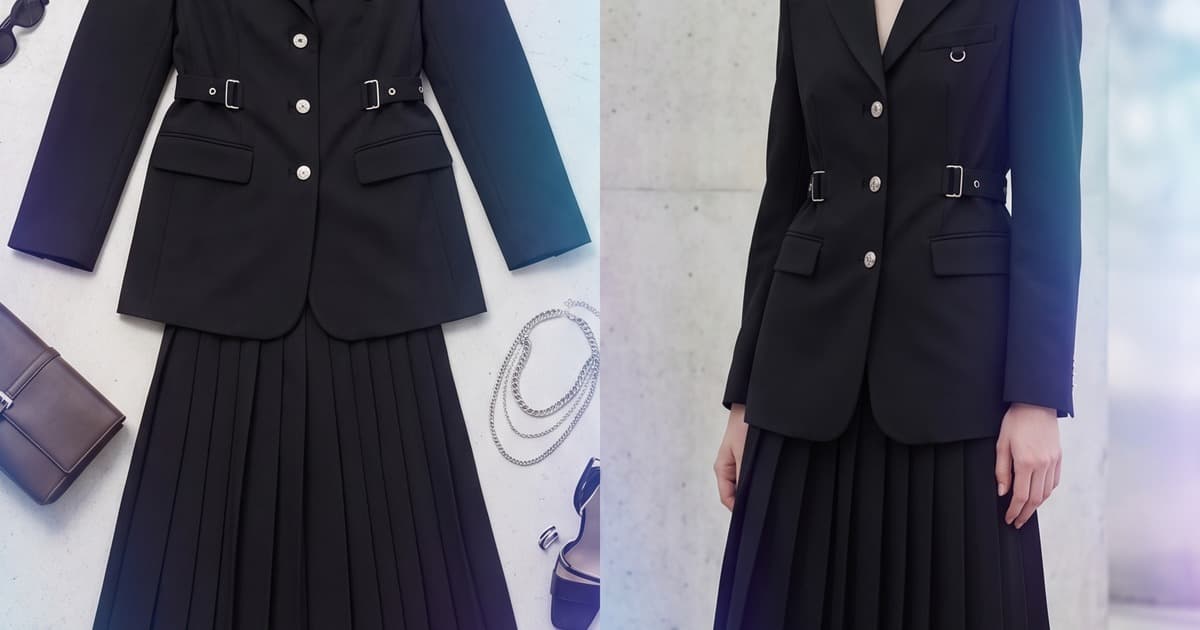
You've got a flat-lay photo of your new jacket. It's clean. The color reads well. The stitching details are visible. But it's sitting on a white surface looking like every other product photo on every other brand's website.
Now imagine that same jacket worn by a professional-looking model, styled against a warm editorial background, arranged across six lookbook pages with matching trousers and accessories — and ready to go live today.
That's not a hypothetical. That's what AI is doing for fashion brands right now, and flat-lay photos are the perfect input to make it happen.
Why Flat-Lays Are the Ideal AI Input
There's a reason flat-lay photography became the default workflow for product teams: it's fast, controllable, and scales easily. You can photograph 50 garments in a single afternoon with consistent lighting and no model logistics.
What flat-lays lack is story. On-model shots convert better. Lifestyle contexts build brand identity. Editorial compositions command attention on social and wholesale presentations.
AI closes that gap — and flat-lays are actually better AI input than ghost mannequin or on-model shots, for a few reasons:
- Fabric detail is clear. AI can read texture, drape, and construction accurately from a flat garment.
- No model interference. The AI isn't trying to separate garment from body — it's working from a clean source.
- Consistent color reference. Flat lighting preserves accurate color that the AI uses as a reference during generation.
- Fast to shoot. You already have a process for this. The AI layer adds output — it doesn't change your input workflow.
The result: your flat-lay photography workflow stays exactly the same. The output multiplies dramatically.
Step-by-Step: From Flat-Lay to Finished Lookbook Page
Here's how the journey works in practice.
Step 1 — Photograph Your Flat-Lay
Nothing changes here. Place the garment on a clean, well-lit surface. Shoot from above with consistent lighting. White or neutral backgrounds work best, but textured surfaces are fine too.
What to capture:
- Full garment shot (overhead)
- Detail shots of key features (buttons, stitching, prints)
- Front and back if relevant
- Accessories or complementary pieces alongside
Resolution matters — shoot at least 2000px on the short side. AI generation quality scales with input quality.
Step 2 — Upload to Your AI Platform
Upload your flat-lay image to Tellos AI Photo Studio. At this stage, you're making a set of creative decisions:
AI model selection — Choose from a library of diverse AI fashion models. Match to your brand's aesthetic: age, style, look, body type. The same model can be used consistently across your entire collection, creating visual coherence across hundreds of SKUs.
Pose and framing — Select poses appropriate for the garment type: standing editorial, walking motion, three-quarter turn, close-up crop. For outerwear, open poses that display the full silhouette work best. For bottoms, leg-forward poses that show fit and length.
Background and setting — Lifestyle context, studio backdrop, urban environment, interior space. Your background choice defines the editorial voice of the lookbook.
Step 3 — Generate On-Model Shots
The AI generates multiple variations of your product on the chosen model, in the chosen pose and setting. This happens in minutes — not hours or days.
What you get back:
- Multiple angles of the same garment on model
- Consistent lighting that matches across your entire batch
- Professional styling that positions the garment the way a stylist would
- Accurate color representation from your flat-lay reference
- Clean backgrounds ready for layout
A single flat-lay can generate 8–12 distinct on-model images across different poses, settings, and crops — more output than a traditional half-day shoot.
Step 4 — Create Lifestyle Context
Beyond pure product-on-model shots, AI can place your garment into fully realized lifestyle scenarios. This is where flat-lay to lookbook goes from functional to genuinely editorial.
Think about the story your collection tells:
- A linen summer dress moving from morning coffee to beachside afternoon
- A structured blazer in a minimalist workspace, then a rooftop terrace
- A knitwear collection in a warm apartment interior, Sunday morning mood
The AI uses your garment as the anchor and builds a coherent visual world around it. The same jacket that started as a flat-lay can now exist in five different contexts, each one feeding a different content channel — lookbook, social, email, ads.
Step 5 — Arrange into Lookbook Narrative
With a full bank of on-model and lifestyle shots generated, the lookbook layout becomes an editorial exercise rather than a logistics exercise. You're choosing from abundance instead of making do with what the shoot day delivered.
This is the underappreciated advantage of AI generation: you have options.
Traditional shoots produce roughly what you planned for. AI generation produces multiples of what you need — meaning your lookbook layout has genuine creative flexibility. Layout and design principles like visual rhythm, page pacing, and image pairing all work better when you can choose from 8 variations of a shot rather than 2.
Practical lookbook arrangement tips when working with AI-generated content:
- Group similar moods and settings on adjacent spreads
- Vary crop distance: full-body, three-quarter, and detail crops keep pages dynamic
- Use one hero image per spread — let the others support
- Keep model, lighting, and background consistent within a collection chapter
- Save your strongest image for the opening spread
Before and After: The Real Difference in Output
Let's be concrete about what changes.
| Traditional Flat-Lay Only | Flat-Lay + AI Generation | |
|---|---|---|
| Content output | 1 product image per SKU | 8–12 images per SKU |
| On-model shots | Not included | Full editorial on-model |
| Lifestyle contexts | Not included | Multiple settings per garment |
| Lookbook readiness | Not suitable | Fully lookbook-ready |
| Turnaround | Final — no further production | Generated same day |
| Cost per SKU | Shoot cost already sunk | Incremental AI generation cost |
The math is straightforward. You're already shooting flat-lays. Adding an AI generation layer on top of that existing workflow turns a functional product archive into a complete content library.
Why This Matters for Smaller Brands Especially
For enterprise brands with dedicated photo studios and production teams, adding AI is an efficiency play. For smaller and mid-sized brands, it's a strategic equalizer.
Before AI, producing a professional lookbook meant:
- Hiring a photographer
- Booking models through an agency
- Renting a studio or location
- Hiring a stylist and hair/makeup artist
- Coordinating a full shooting day
- Editing and retouching over weeks
- Laying out the lookbook with a designer
That's $5,000–$25,000 minimum for a seasonal lookbook, depending on brand scale. Many brands simply couldn't afford to do it properly every season. They shipped with flat-lays and watched conversion rates suffer.
AI eliminates most of that cost and all of that coordination. A brand with 30 SKUs and a flat-lay photography setup can now produce a complete, professional lookbook in a single afternoon — without booking a single freelancer.
The cost comparison between traditional production and AI generation is stark, and it's changing what's possible for independent and emerging brands.
Consistency Across Your Entire Collection
One of the structural advantages of AI generation from flat-lays is consistency at scale.
When you use the same AI model, the same lighting parameters, and the same background settings across your entire collection, every image in your lookbook belongs together. Same skin tones, same catch-light in the eyes, same color temperature, same depth of field approximation.
Traditional shoots rarely achieve this. Different days, different assistants, changing natural light — even the most controlled studio environment introduces variation across a 50-SKU shoot.
AI doesn't drift. SKU 1 and SKU 50 look like they were photographed in the same 10-minute window — because effectively, they were.
For wholesale buyer presentations and seasonal lookbook production, this consistency matters. Buyers notice when catalogs look patched together. A cohesive visual identity signals a brand that's in control of its product and its story.
Flat-Lays as a Pre-Production Strategy
Here's a use case that's increasingly common: brands are shooting flat-lays of their samples — sometimes even of garment prototypes — and using AI to generate full lookbook imagery before production runs are complete.
Why? Because pre-order content matters. Wholesale buyers place orders based on catalog imagery. Pre-order customers commit based on how a product looks worn. If you're waiting for finished inventory before you can generate marketing content, you're losing weeks of lead time.
With AI, a flat-lay of a sample garment — even an early-stage sample — can become a full on-model lookbook image that goes into your buyer presentation or pre-order page. The caveat: be honest about what's a render vs. a final product photo, and ensure accuracy is sufficient that the final item matches expectations.
For most brands, this workflow unlocks a seasonal launch calendar that wasn't previously possible.
Integrating AI Output Into Your Broader Content Strategy
The lookbook is the anchor, but it's not the endpoint. The on-model images you generate from flat-lays feed your entire content calendar.
From a single AI-generated on-model shot:
- Product detail page — crop to product focus, use as primary PDP image
- Instagram post — full editorial shot with lifestyle context
- Instagram Story — vertical crop of the model, garment centered
- Email campaign — hero image for seasonal send
- Paid social ads — clean product image with clear garment read
- Wholesale catalog — professional model presentation for buyers
- Website banner — lifestyle context at banner crop ratio
One flat-lay input. One AI generation session. Twelve content pieces ready to deploy across every channel.
This is how AI catalog shoots become content goldmines — not because the technology does something magical, but because it removes the production bottleneck that was limiting what your flat-lay archive could become.
What to Look For in an AI Fashion Photo Platform
Not all AI photo tools handle fashion garments equally. When evaluating platforms, look for:
Garment accuracy — The AI should preserve your fabric's color, texture, and construction details accurately. Distortions in print patterns or logo placement are a red flag.
Model diversity — A broad library of AI models representing different body types, skin tones, and ages. Your catalog should reflect your customers.
Consistency controls — The ability to fix a model, lighting setup, and background across an entire batch — not just one image at a time.
Pose range — Different garment categories need different poses. A platform that offers pose variety appropriate to outerwear, dresses, activewear, and accessories will serve the full range of your catalog.
Output volume — Can it process 50 SKUs in a session? 200? Production-scale output matters for real catalog workflows.
Integration — Does the output integrate cleanly into your ecommerce platform, PIM, or DAM?
Getting Started
The workflow is simpler than most brands expect.
- Collect your flat-lay images — you probably already have them
- Choose your AI fashion model and visual aesthetic
- Define your background and styling direction for the season
- Batch-generate on-model shots across your collection
- Select the best outputs for your lookbook layout
- Arrange into final lookbook pages
Total additional production time over your existing flat-lay workflow: hours, not weeks.
Start Turning Your Flat-Lays Into Lookbooks
Your flat-lay archive is a starting point, not a final output. Every product photo you've already taken is raw material for a professional lookbook, a full content library, and a wholesale presentation that buyers will take seriously.
Tellos AI Photo Studio transforms flat-lay inputs into editorial-quality on-model imagery at the pace your brand needs — SKU by SKU or at full collection scale.
Start your AI lookbook with Tellos →
No studio. No booking. No waiting. Just your flat-lays and a finished lookbook by end of day.