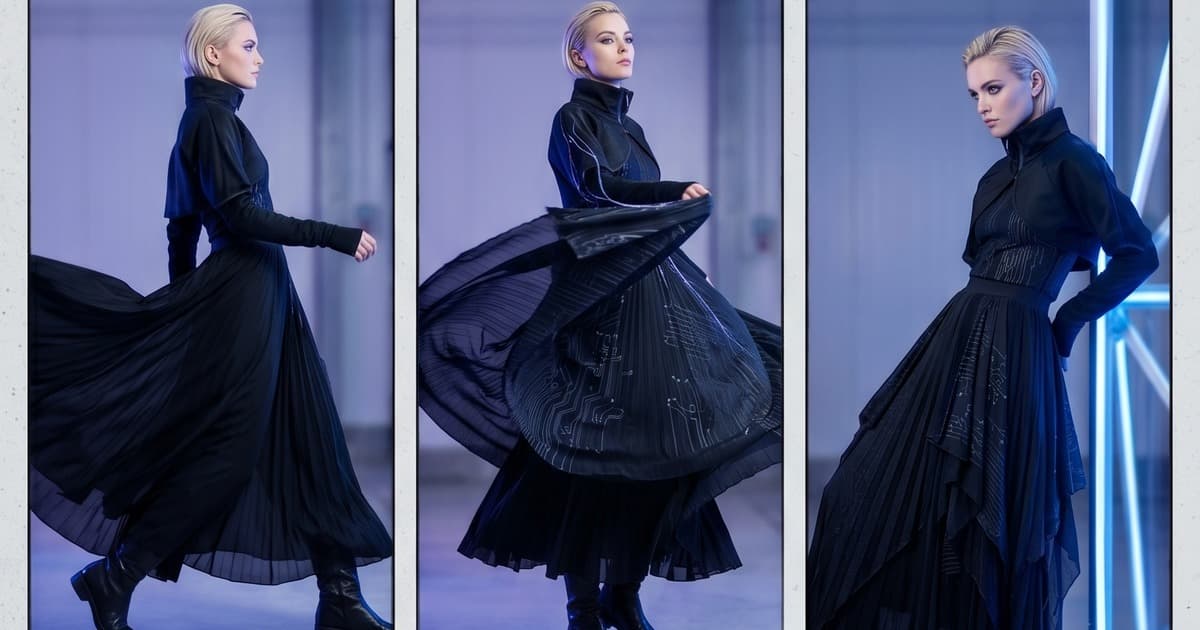
A lookbook that moves is a lookbook that sells.
That's the reality in 2026. Static photo pages still have their place — but the brands capturing attention on social feeds, wholesale buyer portals, and brand homepages are increasingly using video. The drape of a fabric. The flow of a hem. A model turning to reveal the back of a jacket. These moments do things a flat image simply cannot.
The problem has always been cost and complexity. A traditional lookbook video shoot makes a photo shoot look cheap.
AI has changed that equation entirely. Today, fashion brands can take their existing lookbook photos — or generate new ones — and turn them into editorial-quality video content in hours, not weeks. No director. No crew. No location permits.
Here's exactly how it works, and what it means for your content strategy.
Why Static Lookbooks Are No Longer Enough
When digital lookbooks became standard, they were a massive upgrade from print. But the bar has moved again.
Consider what your customers are experiencing across every other touchpoint:
- Social feeds are dominated by short-form video. Reels, TikToks, and Stories have trained buyers to expect movement.
- Competitor brands with larger budgets have been running video lookbooks for years. The gap is closing fast.
- Wholesale buyers reviewing your collection on a tablet or laptop are increasingly comparing your digital showroom to brands that showcase movement — how a coat swings, how jersey fabric clings and releases, how a pleated skirt photographs in motion.
- Website engagement metrics consistently show that video content drives longer session times and higher conversion rates on product pages.
A static lookbook communicates the look. A video lookbook communicates the feel.
And in fashion, feel is everything.
What a Traditional Lookbook Video Shoot Actually Costs
Before we get into AI, let's put a number on the problem.
A mid-level fashion lookbook video shoot — 30 to 50 pieces, a single day of filming — typically involves:
| Cost Item | Estimated Range |
|---|---|
| Director / videographer | €1,500 – €4,000 |
| Models (2–3) | €1,200 – €3,000 |
| Location / studio rental | €800 – €2,500 |
| Hair & makeup | €600 – €1,400 |
| Styling assistant | €300 – €600 |
| Equipment (camera, lighting) | €500 – €1,500 |
| Post-production (editing, colour grading) | €1,500 – €4,000 |
| Music licensing | €200 – €600 |
| Total | €6,600 – €17,600 |
That's per season. For a fashion brand doing two major collections a year, and potentially additional capsule launches, the math gets painful fast.
And that's assuming the shoot goes well. Weather delays. Model cancellations. Wardrobe malfunctions. Continuity errors between looks. One problem day can cascade into a second booking, doubling your costs before you've published a frame.
How AI Turns Lookbook Photos into Video
The core technology behind AI video generation for fashion has matured significantly. Models like Sora, Kling, Runway, and Pika are now capable of generating natural, fluid motion from a single input image. These aren't competitors to your brand — they're the engine under the hood.
What AI video generation does is analyze an input image and synthesize realistic temporal motion: the way fabric moves, the way a model's hair shifts, subtle ambient motion in a background scene. The result is a short video clip — typically 3 to 8 seconds — that feels like it was filmed, not generated.
For fashion specifically, this translates to:
- Fabric movement: Linen and silk behave differently under motion, and the best models are trained to recognize fabric physics
- Natural model movement: A subtle shift of weight, a slow turn, a walk-through — generated from a single posed frame
- Environmental motion: Leaves moving in the background, curtains drifting, water rippling — details that signal "this was filmed here"
- Hair and accessory movement: Earrings swinging, a scarf lifting — the micro-details that make a shot feel alive
Platforms like Tellos orchestrate these underlying models into a structured workflow built specifically for fashion. Rather than prompting a video model directly (which requires significant technical knowledge and iteration), you work through a fashion-first interface that understands garment categories, model poses, and brand consistency requirements.
The output: a short video clip per look, ready for editing into a full lookbook video.
Creating a Video Lookbook from Existing AI Photos: The Full Workflow
If you've already generated your lookbook photos with AI — which is increasingly common (see: AI Lookbook Photography: How Fashion Brands Create Seasonal Collections Without a Studio) — turning those images into video is a natural next step.
Here's how the workflow typically runs:
Step 1: Select Your Hero Images
Not every lookbook photo needs to become a video clip. For a 40-piece collection, you might select 15 to 20 hero looks — the ones that carry the most visual interest or represent the collection's key stories.
Prioritize:
- Flowing or structured fabrics where movement adds the most value
- Full-length shots where model movement reads clearly
- Lifestyle contexts where environmental motion is plausible
- Your most commercial pieces — hero SKUs, bestsellers, investment items
Step 2: Generate Video Clips per Look
Upload your selected images into an AI video generation workflow. Tellos orchestrates this process automatically — you select your input images, set the motion style (subtle and editorial, energetic, etc.), and the platform generates clips across all your selected looks in a batch.
Typical output per clip: 4–6 seconds. That's the sweet spot for fashion — long enough to register the garment, short enough to cut cleanly in an edit.
Step 3: Edit into a Lookbook Video
With your clips in hand, editing is straightforward. The structure of a lookbook video usually follows one of three formats:
Format 1: Collection Reel (60–90 seconds) Quick cuts across all hero looks. Designed for social distribution and pre-roll advertising. Each look gets 2–4 seconds.
Format 2: Editorial Narrative (2–4 minutes) Slower pacing, grouped by chapter (e.g., "Day", "Evening", "Occasion"). One to two clips per look with room for on-screen type, music, and brand storytelling. Designed for website and buyer presentations.
Format 3: Individual Look Clips (10–30 seconds each) Per-product short-form videos for PDPs, Instagram Reels, TikTok, and email. Each look gets its own moment.
The beauty of AI-generated clips: because they're generated from consistent source images (same lighting setup, same AI model, same background treatment), editing cuts cleanly. There are no continuity mismatches between looks because there was no physical production to go wrong.
Step 4: Add Audio and Finishing Touches
Music transforms a clip compilation into a brand experience. Options include:
- Licensed library music (Epidemic Sound, Artlist, Musicbed)
- AI-generated music (Suno, Udio) — increasingly viable for fashion video
- No music / ambient only — works well for luxury and editorial-forward brands
Add your logo endcard, a URL, and you're done.
Why This Changes Your Content Strategy
The traditional model was: shoot once, repurpose carefully. You had limited footage, so every cut had to count.
The AI model is: generate continuously, repurpose abundantly. When generating a clip per look takes minutes rather than days on set, your content inventory changes entirely.
Specifically:
Your lookbook becomes a video library, not a static document. Every look you've AI-generated photos for is also a potential video clip. Your existing catalog of AI images is a waiting production queue.
Content calendar pressure drops. If you need fresh social video content this week, you don't schedule a shoot — you generate a few new clips from existing assets. See how brands are approaching this: Fashion Brand Content Calendar: How AI Makes Every Shooting Day a Content Goldmine.
Pre-order and seasonal launch content becomes possible before samples exist. If you can generate lookbook photos from design files before the collection ships, you can generate video lookbooks before a single sample has been cut. Campaign goes live the moment the collection drops.
Wholesale presentations become immersive. Sending a buyer a PDF is standard. Sending a buyer a beautifully edited 90-second collection reel is memorable. AI wholesale catalogs paired with video walkthroughs are becoming a genuine differentiator in B2B sales.
Distribution: Where Fashion Lookbook Videos Live
Once you have your clips, the question is where they go. The answer is: everywhere.
Website
- Brand film / hero section: Your collection reel as the homepage hero video
- Lookbook page: Full editorial-format video alongside your static lookbook PDF
- Product pages: Per-product 10–30 second clips replacing or supplementing static photography
Video on product pages has been shown to increase dwell time and conversion rate across almost every fashion category. Shoppers who watch a product video are more likely to add to cart than those who only see images.
Social
- Instagram Reels: Collection reel broken into 15–30 second cuts; individual look clips for organic content
- TikTok: Slightly more informal cuts; raw "watch the collection come to life" style content also performs well here
- Pinterest video pins: Often underutilized, but Pinterest users actively pin video lookbook content for future purchase consideration
- YouTube Shorts: Worth distributing for discoverability; YouTube's search volume for fashion-related terms is significant
B2B / Wholesale
- Trade show presentations: Play your collection reel on a loop at your booth. Works far better than printed lookbooks in a noisy trade show environment.
- Buyer pitch decks: Embed video clips directly into your Keynote/PowerPoint/PDF pitch materials
- Wholesale platform profiles: Platforms like Faire, NuOrder, and Joor increasingly support rich media in brand profiles
- Email outreach: A GIF derived from your lookbook video clip embedded in buyer outreach emails increases click-through rates
Email Marketing
Short looping GIFs extracted from your video clips add motion to email campaigns without the weight of a full video file. One or two animated clips per email — especially effective for hero product announcements, seasonal launches, and re-engagement campaigns.
Tips for Getting the Best Results from AI Lookbook Videos
AI video generation for fashion is powerful, but it rewards deliberate creative direction. A few things that consistently produce better results:
Start with strong source images. The output quality of an AI video clip is bounded by its input. AI editorial photography that's well-composed, well-lit, and shows the garment clearly will generate better motion than a rushed or cluttered reference image.
Use subtle motion settings for editorial content. Dramatic camera moves and extreme pose changes can look uncanny. The sweet spot for fashion is subtle: weight shift, fabric drift, gentle turn. More editorial brands should lean into restraint.
Batch by look type. Group your motion generation by garment category: knitwear behaves differently from leather, and generating in batches lets you calibrate motion settings for each category rather than applying a single setting across everything.
Keep clips short for social, longer for editorial. Social platforms reward tight cuts. Wholesale buyer presentations can afford a slower, more considered pace. Generate the same look at multiple durations and select based on distribution context.
Maintain your brand's visual consistency. If you've built your lookbook around a consistent aesthetic — same AI model, same lighting, same colour palette (see: Consistent Fashion Photography at Scale) — carry that through to your video content. Consistency builds brand recognition across every touchpoint.
The Bottom Line
Fashion lookbook video is no longer a "nice to have" for brands with video production budgets. It's a reachable standard for any brand generating AI content.
The workflow is simple:
- Generate your lookbook images with AI (or use existing ones)
- Animate your hero looks into short clips
- Edit into formats for each distribution channel
- Publish — website, social, wholesale, email
What used to require a full video production team and a week of post-production now takes a morning.
The brands winning on Instagram, converting buyers at trade shows, and building recognizable visual identities in 2026 are the brands treating their content infrastructure as a competitive advantage. AI video is a core part of that.
Start Creating Fashion Lookbook Videos with Tellos
Tellos AI Video Studio gives fashion brands everything they need to turn product photos and lookbook images into editorial-quality video content — without a crew, a set, or a production budget.
Generate motion clips for individual looks. Export collection reels. Build a video library that powers your social channels, wholesale presentations, and product pages — all from a single platform.