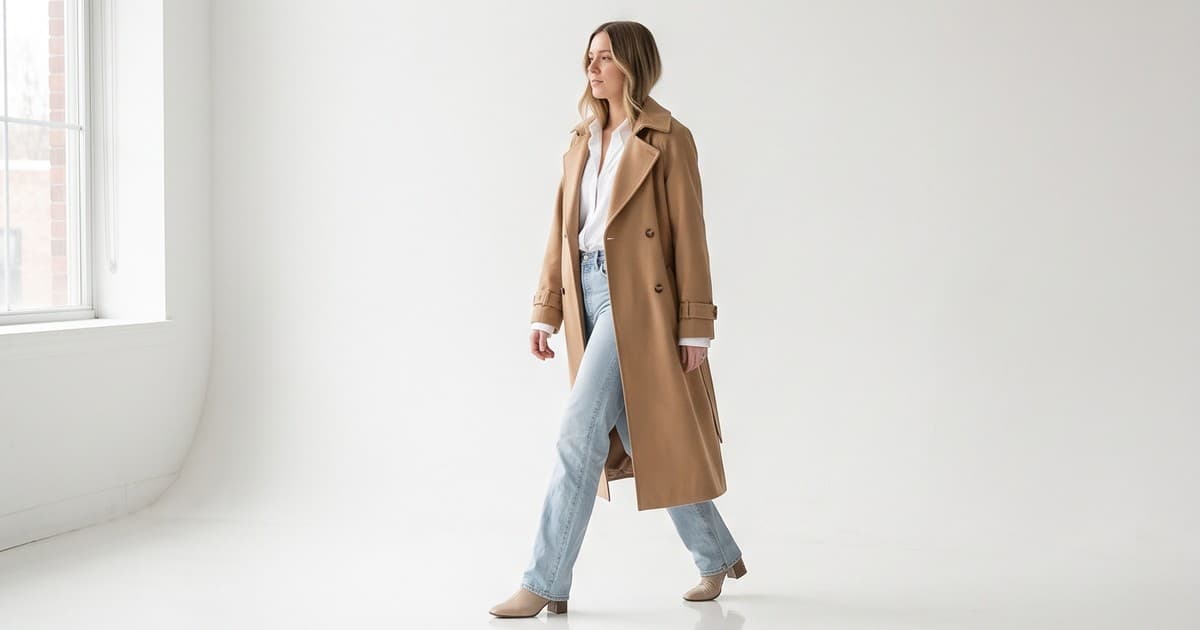
Most fashion stores do not have a video problem. They have a video mix problem. They shoot one hero brand film a season, post a few behind-the-scenes clips, and then wonder why the product pages still convert like it's 2016.
Ecommerce video works when each clip has one job in one place. A 6-second walk cycle on a product page does a different job than a 20-second hook-driven Reel or a retargeting ad. Mix those up and you pay for content that looks nice and moves nothing.
This guide breaks down the product video types that actually sell for fashion stores in 2026, where each one belongs (PDP, ads, social), what specs to hit, and how to produce them at catalog scale without a studio day for every SKU.
What "Ecommerce Video" Means for a Fashion Store
For a fashion brand, ecommerce video is any short clip whose main purpose is to help a shopper decide to buy a specific product. That's narrower than "brand video" and broader than "ads."
It sits in three places:
- On-site: product detail pages (PDPs), collection pages, homepage modules, and shoppable galleries
- Paid: Meta, TikTok, Pinterest, YouTube, and Google placements
- Organic social and owned channels: Reels, TikTok, Pinterest Idea Pins, email, and SMS
The common thread: the garment is the hero. Fit, drape, texture, movement, and scale are the things a still photo struggles to show and a shopper needs to see before they commit. If a clip doesn't make one of those clearer, it isn't doing ecommerce work.
Why fashion needs video more than most categories
Fashion has a uniquely high gap between "looks good in a photo" and "looks good on me." Shoppers can't touch the fabric or try the fit, so they look for proxies:
- How does the hem move when the model walks?
- Is the fabric stiff, fluid, sheer, or heavy?
- Where does the waistband sit when the model turns?
- What does the color look like in natural light versus studio light?
Video answers all four in a few seconds. That's why we've seen video tied closely to conversion and return rates in fashion, which we cover in depth in our post on product video conversion rate in ecommerce and our guide to reducing fashion returns with better product visuals.
The 8 Product Video Types That Sell
Here are the formats worth building into your content system, grouped by where they earn their keep.
1. The PDP walk cycle (on-site)
A model walks toward camera, turns, and walks back. 4 to 8 seconds, looping, no sound.
This is the single highest-value ecommerce video for apparel. It shows fit, drape, and movement in one shot, and it sits right next to the add-to-cart button.
Best for: dresses, skirts, outerwear, wide-leg trousers, anything with movement Placement: second or third slot in the PDP gallery, autoplay muted Spec: 4:5 or 9:16 vertical, under 2 MB if possible, MP4 with a poster image
2. The 360 turn (on-site)
The model stands still and rotates slowly, or the camera orbits. 6 to 10 seconds.
The 360 is less dramatic than a walk cycle but better for structured pieces where the back and side details matter: tailored blazers, denim, corsetry, bags.
Best for: tailoring, denim, back-detail pieces, accessories Placement: PDP gallery, often right after the front hero photo
3. The fabric and detail close-up (on-site and social)
Macro shots of texture, stitching, hardware, prints, and how light hits the material. 3 to 6 seconds.
Close-ups answer the "is this cheap?" question that kills a lot of mid-priced fashion purchases. They also cut into the "not as pictured" return reason.
Best for: knitwear, linen, satin, sequins, leather, jewelry Placement: PDP gallery, Pinterest, and as B-roll inside longer social clips
4. The styling or outfit video (on-site and social)
One hero product shown in two or three different looks. 10 to 20 seconds.
This is your average order value video. It shows the shopper how to wear the piece and quietly sells the other items in the outfit.
Best for: basics, layering pieces, capsule collections Placement: PDP (lower gallery slot), collection pages, Reels, email
For more on how this plays out across a full collection, see our AI content creation playbook for fashion brands.
5. The hook-led paid ad (paid)
A short video built for the feed, not the product page. 6 to 15 seconds, with a visual hook in the first second, the product clearly shown by second three, and an offer or reason to click at the end.
Paid ads are where most fashion brands burn money on video, mainly by running a single creative too long. Creative fatigue sets in fast on Meta and TikTok, and the fix is volume: more variants, more hooks, more models, more backgrounds.
Best for: prospecting, new collection launches, retargeting Placement: Meta Feed, Reels, Stories, TikTok, Pinterest Spec: 9:16 first, then 4:5 and 1:1 cuts
We go deep on hooks in AI video hooks for fashion ads: the first 3 seconds and on testing in Meta ads for fashion: testing 20 creative variants.
6. The colorway and variant video (on-site and paid)
The same garment shown in every color, either as a quick cut sequence or a split-screen. 5 to 12 seconds.
This solves a real merchandising problem: shoppers often only see the color in the hero image and never discover the other variants. A colorway clip surfaces the whole range.
Best for: basics with many colorways, knitwear, swim, activewear Placement: PDP, collection pages, carousel ads
Our 8 colorways product photography guide covers the still-image side of the same problem.
7. The lookbook and editorial clip (social and brand)
Moodier, more styled footage that sells the collection's world: location, lighting, attitude. 15 to 45 seconds.
This is the one format where brand feel matters more than product clarity. Use it to launch a season, not to sell a single SKU.
Best for: collection launches, homepage hero, wholesale buyers Placement: homepage, Instagram, YouTube, wholesale decks
See fashion lookbook video: turn static catalogs into moving editorial content for how to produce these at speed.
8. The UGC-style clip (social and paid)
A handheld, phone-native, "real person" feel, often with a try-on or a quick review angle. 10 to 30 seconds.
UGC-style video still performs well in paid social because it blends into the feed. The catch is supply: real creators are slow and inconsistent at catalog scale. Many brands now mix real UGC with AI-generated clips that keep the casual framing but guarantee accurate product representation. Our UGC vs AI product photography comparison covers the trade-offs.
Which Video Types Go Where: A Quick Map
| Video type | PDP | Collection page | Paid ads | Organic social | |
|---|---|---|---|---|---|
| Walk cycle | Core | Yes | Yes | Yes | Yes (GIF) |
| 360 turn | Core | Optional | Rarely | Optional | No |
| Fabric close-up | Yes | No | B-roll | Yes | Optional |
| Styling / outfit | Yes | Yes | Yes | Core | Yes |
| Hook-led ad | No | No | Core | Yes | No |
| Colorway / variant | Yes | Core | Yes | Optional | Yes |
| Lookbook / editorial | No | Homepage | Launch only | Core | Yes |
| UGC-style | Optional | No | Core | Yes | Optional |
If you're starting from zero, build the PDP walk cycle first. It's the format closest to the purchase and the easiest to measure.
How to Prioritize When You Can't Do Everything
Most operators have a fixed budget and too many SKUs. Here's a simple order of operations.
Step 1: Cover your top sellers on the PDP
Pull your top 20% of SKUs by revenue. Give every one of them a walk cycle and a detail close-up. These products already have traffic, so any lift in conversion compounds immediately.
Step 2: Cover high-return SKUs
Next, pull SKUs with the highest return rates, especially those with "fit" or "not as expected" reasons. Add 360 turns and fabric close-ups to show exactly what the shopper is getting.
Step 3: Feed paid social with variants
Once PDPs are covered, start turning the same assets into hook-led ad variants. One garment can yield a dozen ad creatives by changing the model, background, hook, and crop.
Step 4: Fill the organic calendar
Use styling videos, lookbook clips, and colorway reels to keep social active. Our post on building a fashion brand content calendar shows how to plan this around a single production cycle.
Step 5: Long tail and new arrivals
Finally, standardize video for every new product at launch, so you're not playing catch-up each season.
Specs That Matter (and the Ones That Don't)
Fashion teams lose a lot of time on technical debates that don't move sales. Here's what actually matters.
Specs that matter
- Aspect ratio: 9:16 for social and ads, 4:5 for most PDP galleries and Meta feed, 1:1 as a fallback. Shoot or generate in a format that crops cleanly to all three.
- Length: 4 to 8 seconds for PDP loops, 6 to 15 for ads, up to 30 for organic social.
- File size: keep PDP videos light. Heavy video files hurt page speed, and page speed affects both conversion and search rankings.
- Poster frame: always set a strong first frame. Many shoppers see the poster before playback starts.
- Captions: for any clip with voice or text, burn in captions or add them natively. Most social video is watched without sound.
- Accurate color: the garment's color must match the physical product. This is non-negotiable for return rates.
Specs that matter less than you think
- 4K resolution. On a phone-sized PDP, 1080p is usually plenty, and it loads faster.
- Cinematic camera moves. Simple, steady framing that shows the product outperforms fancy moves on most PDPs.
- Long intros and logo animations. Cut them. Shoppers scroll past.
For the SEO side of video, including how to mark up product videos so search engines can find them, read our product video schema markup guide.
Video Ecommerce by Platform: What Changes
The same garment needs slightly different treatment depending on where the clip runs.
Shopify and your own store
- Autoplay muted, looping clips in the product gallery
- Shoppable video galleries on collection pages and the homepage
- Lightweight files with lazy loading below the fold
Our shoppable videos for Shopify setup guide and shoppable video galleries for collection pages walk through the setup.
Amazon
- Clear, product-first video with no off-Amazon calls to action
- Focus on fit, fabric, and scale
- See AI product photography for Amazon fashion listings for listing-specific guidance
TikTok and TikTok Shop
- Native-feeling, fast-cut, trend-aware clips
- Strong hook in the first second
- Our TikTok Shop vs Instagram Shop comparison covers where each format performs
Instagram and Meta ads
- Reels-first vertical video, with 4:5 feed cuts
- Heavy creative variant testing to fight fatigue
- Aesthetic, styled, aspirational clips
- Strong performance for styling and lookbook content
- See fashion photography for Pinterest
The Production Problem: Why Most Fashion Stores Under-Produce Video
Here's the honest reason most fashion stores don't have this video mix: traditional production doesn't scale to a catalog.
A typical studio video day involves:
- Booking models, a videographer, a stylist, and hair and makeup
- Shipping samples to the studio
- Shooting a limited number of looks per day
- Days or weeks of editing
- Re-shoots when a new colorway lands
That works for a 10-look hero campaign. It falls apart when you have 300 SKUs, four drops a year, and need ad variants every week. We broke down the numbers in fashion photography cost in 2026: traditional vs AI.
Where AI video fits
AI video production changes the economics. Instead of booking a shoot per product, you start from the photos you already have (flat lays, ghost mannequin shots, or on-model images) and generate on-model video from them.
The underlying video models, such as Kling, Sora, and Runway, are powerful technology. But a raw model on its own isn't a fashion production workflow. Brands still need:
- Garment accuracy: the generated video must match the real product's cut, color, and details
- Consistent models: the same virtual model across a collection, or a diverse cast on demand
- Brand control: consistent lighting, backgrounds, and style across thousands of clips
- Catalog scale: batch production across hundreds of SKUs, not one prompt at a time
- Ready-to-use outputs: the right aspect ratios and lengths for each channel
That's the layer a platform like Tellos provides. It uses advanced models as the engine and wraps them in a fashion-specific workflow, so the output is usable on a PDP or in an ad, not just impressive in a demo. Our posts on Kling for ecommerce fashion product videos and Sora for fashion brands cover how these models fit in.
If you want the step-by-step, start with how to turn product photos into video.
A Simple Ecommerce Video Workflow for Fashion Teams
Here's a workflow that a small ecommerce team can run every drop.
- Collect source images. One clean front image per SKU, plus back and detail shots where possible.
- Choose your video types per SKU. Use the priority list above: walk cycle and detail for everything, 360 for structured pieces, colorway for multi-variant items.
- Pick models and backgrounds. Lock a consistent brand look for PDPs. Allow more variety for ads and social.
- Generate in batches. Produce all PDP clips for a drop at once, then ad variants.
- QA for accuracy. Check every clip against the physical sample: color, length, hardware, print placement.
- Export per channel. 4:5 for PDP, 9:16 for social and ads, 1:1 where needed.
- Publish and tag. Upload to the PDP, add video schema, and tag ads by hook and variant so you can learn what works.
- Measure and iterate. Compare conversion and return rates for SKUs with and without video. Double down on the formats that win.
How to Measure Whether Your Ecommerce Video Is Working
Don't judge video on views. Judge it on the job it was assigned.
| Video type | Primary metric | Secondary metric |
|---|---|---|
| PDP walk cycle / 360 | PDP conversion rate | Return rate |
| Fabric close-up | Return rate ("not as described") | Time on page |
| Styling video | Average order value | Items per order |
| Hook-led ad | Cost per purchase | Thumb-stop rate, CTR |
| Colorway video | Variant sell-through | Add-to-cart rate |
| Lookbook clip | Collection page traffic | Engagement, saves |
| UGC-style | Cost per purchase | Hold rate |
The cleanest test: pick 20 to 50 similar SKUs, add video to half, and compare conversion and return rates over four to six weeks. That gives you a number you can defend in a budget meeting.
Common Mistakes to Avoid
- Using brand films as product videos. Beautiful, but they don't show fit.
- Hiding video deep in the PDP gallery. Put it in the first three slots.
- One creative per ad set. Fatigue kills performance. Rotate variants.
- Inaccurate color or details. Any mismatch between video and product drives returns.
- Heavy files. Slow pages lose shoppers and rankings.
- No measurement plan. If you can't tie a video type to a metric, you can't defend the spend.
The Bottom Line
The fashion stores winning with ecommerce video in 2026 aren't the ones with the biggest brand films. They're the ones with the right video type on every product, in every channel, refreshed fast enough to keep ads from fatiguing and new arrivals from launching without motion.
Start with walk cycles on your best sellers. Add detail and 360 clips for high-return SKUs. Then turn those assets into ad variants and social content. Once production stops being the bottleneck, video becomes a default for every SKU instead of a luxury for a few.
Create Every Product Video Type From Your Existing Photos
Tellos turns your product photos into on-model fashion videos for PDPs, ads, and social, with accurate garments, consistent models, and catalog-scale output. No studio, no samples shipped, no reshoots for new colorways.
Try the Tellos AI Video Studio and produce your first batch of ecommerce videos this week.