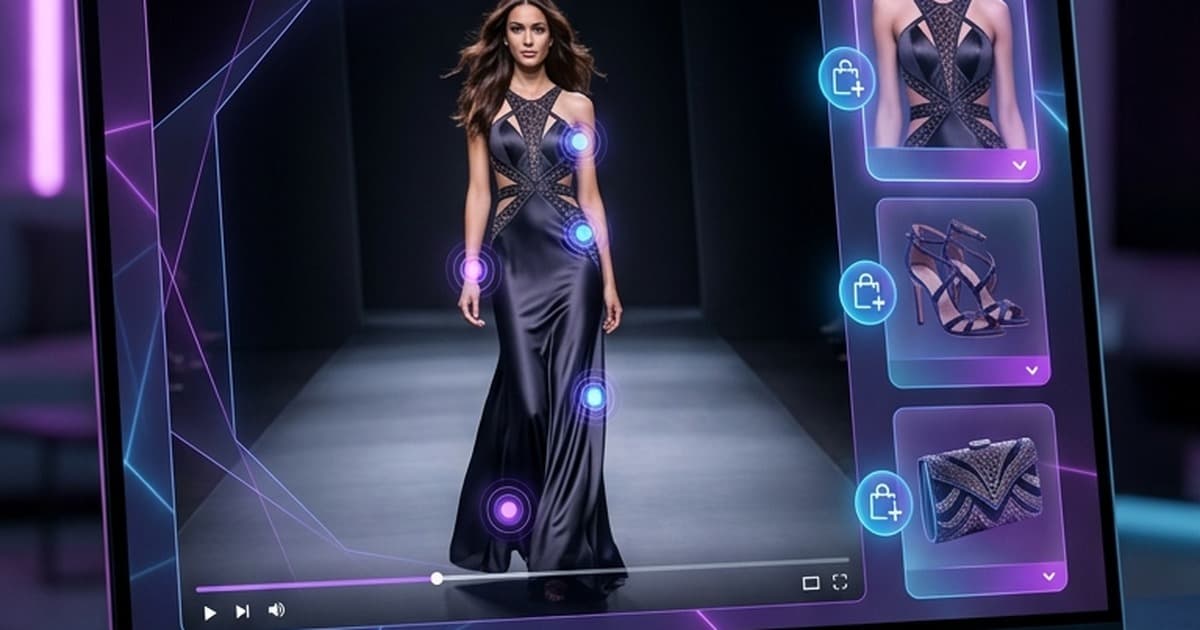
Fashion is the category where product video matters most — and where most Shopify brands are still doing it wrong.
Still images show your product. Video sells it. The drape of a fabric, the movement of a hem, the way a jacket fits when someone's actually wearing it — none of that comes across in a flat-lay or a mannequin shot. Yet the average fashion DTC store on Shopify still relies on static imagery for 90% of its PDP real estate.
That gap between what converts and what most brands are actually publishing is where the right Shopify product video app creates a real competitive edge.
This post breaks down what to look for in a product video app for fashion, the difference between manual upload tools and AI-generated video platforms, and a clear-eyed comparison of the best options available in 2026 — including which one does something none of the others can.
Why Product Video Is Non-Negotiable for Fashion Brands in 2026
The data is not subtle. Product videos increase ecommerce conversion rates by up to 80% on product detail pages — and fashion is the category with the largest delta between video and static content.
Here's why video hits harder for fashion specifically:
- Fit and drape are kinetic. A dress on a model walking looks completely different from a dress in a studio pose. Buyers need to see motion.
- Texture and fabric read in light and shadow. Video captures how satin shimmers, how denim ages, how knitwear moves — details that static photography flattens.
- Return rates go down. When shoppers understand what they're buying, they buy more confidently — and return less. For fashion, this alone justifies the investment.
- Algorithm uplift. Whether it's Google Shopping, TikTok Shop, or Meta, every major commerce platform is prioritizing video content in 2026. Stores without video aren't just missing conversions — they're missing distribution.
The problem has always been production. Traditional video production for a 200-SKU fashion catalog is a scheduling and budget nightmare. Enter the new generation of Shopify video apps — which has split into two very different categories.
Two Approaches: Manual Upload vs. AI-Generated Video
Before comparing specific apps, it's worth being clear on the fundamental choice you're making.
Manual Upload Apps
These apps give you a shoppable video player for your Shopify store. You bring the video — they handle the display, interactivity, and embed logic. The best ones offer:
- TikTok-style scroll-feed embeds
- Product tagging within videos (tap to buy)
- PDP and collection page placement
- Analytics on watch time, tap rate, and conversions
The UX is polished. The results, when you have great video content, are excellent. The bottleneck is always the same: you need to produce the videos first.
For fashion brands, this means an ongoing dependence on shoots — booked studios, hired models, scheduling windows, edit cycles. You can publish shoppable video on your PDPs, but only after clearing all of that. Most brands end up with shoppable video on 10–20% of their catalog at best, and those videos go stale as inventory turns.
AI-Generated Video Apps
These apps flip the model. Instead of bringing finished video to a player, you bring product photos — and the AI generates video for you. Fashion-trained models can animate a garment on a figure, create motion from flat lays, generate lifestyle sequences, and produce content ready for PDPs, ads, and social.
The advantages:
- Scale. 200 SKUs can have video. Not just your top-10 heroes.
- Speed. Minutes per asset, not days per shoot.
- Cost. A fraction of traditional production — no crew, no model fees, no studio.
The limitation with most AI video tools: they output files for you to download and distribute manually. That means another step — uploading to your CDN, dropping into your Shopify theme, or feeding into a separate shoppable player. The creation and the embedding are disconnected workflows.
This matters more than it sounds. Every hand-off is an ops burden. And most teams using separate tools end up with video sitting in Dropbox folders rather than live on product pages.
What to Look for in a Shopify Product Video App (Fashion Brands)
Here's the feature checklist that separates apps worth adopting from ones you'll abandon after the first month:
1. AI Video Generation
Can the app create videos from your existing product photography — no shoot required? For fashion, look specifically for:
- On-figure animation (garment on a moving model)
- Motion from flat-lay (fabric movement, lifestyle animation)
- Multiple output formats (square for feed, portrait for TikTok/Reels, landscape for PDP banners)
2. Shoppable Embedding
Can the video actually convert, right on the page? Shoppable embedding means:
- Product cards overlaid or adjacent to the video player
- Add-to-cart or quick-shop triggers within the video experience
- No redirect to a separate page to buy
3. PDP and Collection Page Integration
The video needs to live where buying decisions happen. Look for native Shopify theme integration that lets you:
- Embed on individual product detail pages
- Power a collection-level video feed
- Place a TikTok-style scroll widget on the homepage
4. Analytics
You can't optimize what you don't measure. Essential metrics:
- Per-video watch time and completion rate
- Tap-through rate (clicks on shoppable tags)
- Attribution: revenue and orders influenced by video
- A/B testing support (video vs. static, variant comparisons)
5. Ease of Setup
The best apps install in minutes, not weeks. Bonus points for:
- No-code embed placements
- Shopify native theme integration (no manual Liquid edits)
- Bulk generation for large catalogs
The Landscape: Shopify Product Video Apps in 2026
Here's how the main categories of tools stack up — and what each is actually designed to do.
Shopify Native Video (Built-in)
Shopify's native product media supports video upload — you can add an MP4 to your product gallery and it will autoplay or appear as a carousel item. It does nothing else.
There's no shoppable overlay, no analytics beyond basic Shopify analytics, no AI generation, and the player is a basic media viewer. It's a starting point, not a strategy.
Best for: Brands who want to add one or two hero videos to their top products and aren't ready to invest in a dedicated app.
Ceiling: Very low. Not suitable for catalog-scale video or conversion optimization.
Tolstoy
Tolstoy is one of the most well-known shoppable video players for Shopify. It gives you a TikTok-style video widget you can embed anywhere on your store, with product tagging and tap-to-cart functionality. The UI is polished and the Shopify integration is solid.
It also has basic AI generation capabilities for social content — but it's not purpose-built for fashion product video. The AI models are general-purpose, and generating on-model fashion animation from product photos isn't the core use case.
Best for: Brands who already have a library of UGC or influencer video and want to embed it as a shoppable feed.
Gap: Creating fashion-specific product video at catalog scale isn't what Tolstoy was built for.
Videowise
Videowise is a performance-focused shoppable video platform with strong analytics. It tracks video engagement at a granular level and connects video views to revenue attribution — which is genuinely useful for proving ROI to stakeholders.
It also pulls from TikTok and Instagram, so if your brand is active on social, you can repurpose that content as shoppable widgets on your Shopify store. Setup is relatively fast, and the analytics dashboard is one of the best in this category.
Best for: Data-driven teams who have strong social video content and want to measure its impact on the storefront precisely.
Gap: Like Tolstoy, it's a player/analytics tool — you're still responsible for creating the video content it displays.
Minta
Minta focuses on AI-generated social video — primarily for Meta and TikTok ads. It can pull product data from your Shopify catalog and generate short social clips using templates and AI.
It's designed for paid social, not for PDP embedding. The output is mostly template-based (text overlays, branded frames, product image motion) rather than the realistic on-figure animation that fashion brands need for product pages. And there's no shoppable player to embed on your store — the workflow ends at export.
Best for: Small brands who need templated social content at volume for paid ads.
Gap: Not a product page video solution. Fashion-specific AI animation is limited.
Tellos: AI Creation + Shoppable Embedding in One
Tellos is the only tool in this space that handles both sides of the equation — creating the video and embedding it as a shoppable experience on your Shopify store.
Here's what that looks like in practice:
Step 1: Upload your product photos.
You don't need video footage. Upload the same product images you're already using on your PDPs — flat lays, studio shots, detail images.
Step 2: AI generates fashion-quality product video.
Tellos uses best-in-class AI video models (including Kling, Runway, and similar foundation models) to animate your product images. For fashion, this means on-figure garment animation, fabric motion, lifestyle sequences — not generic stock-style clips. The AI is trained specifically for ecommerce fashion, so the outputs read as polished product content, not AI artifacts.
Step 3: Embed as a shoppable experience on your Shopify store.
This is where Tellos diverges from every other option. Instead of handing you a video file to upload somewhere, Tellos deploys the generated video directly to a shoppable widget that embeds on your PDP, collection page, or homepage. The viewer watches the video and can tap to add directly to cart — all without leaving the page.
Step 4: Track what converts.
Built-in analytics show which videos are driving engagement and revenue, so you can iterate on what works across your catalog.
The result: a complete workflow from product photo to live shoppable video, with no disconnected tools, no manual file transfers, and no dependency on a film shoot.
This matters specifically for fashion brands managing large catalogs. With Tellos, video coverage across your entire product range is achievable — not just for your hero SKUs, but for every item that a shopper might land on.
Comparison: Which App Does What?
| AI Video Generation | Fashion-Specific Animation | Shoppable Embedding | PDP Integration | Analytics | |
|---|---|---|---|---|---|
| Shopify Native | ✗ | ✗ | ✗ | Basic | Minimal |
| Tolstoy | Partial (basic) | ✗ | ✓ | ✓ | Good |
| Videowise | ✗ | ✗ | ✓ | ✓ | Excellent |
| Minta | ✓ (social templates) | Limited | ✗ | ✗ | Basic |
| Tellos | ✓ (catalog-scale) | ✓ | ✓ | ✓ | ✓ |
Tellos is the only app in this comparison that completes the full loop: generates fashion-quality video from your product photos and embeds it as a shoppable experience on your store.
Manual Upload vs. AI-Generated: The Real Operational Difference
Let's be honest about what manual upload workflows look like at scale.
For a brand with 150 active SKUs, keeping shoppable video live and current means:
- Scheduling shoots as new product arrives
- Editing and approving video assets (days to weeks per batch)
- Uploading to your shoppable player
- Re-doing all of that when products go out of stock and new inventory comes in
The result is that most brands using manual-upload shoppable players end up with video coverage on maybe 15–20% of their catalog — and those videos quickly become outdated as inventory cycles.
AI-generated video flips this. New product photos come in from your photographer or supplier, they go into Tellos, and the videos are live on the store before the product even launches. When inventory turns, you generate new videos in minutes. The overhead is an order of magnitude lower.
For fashion brands specifically — where product turnover is high and catalog depth is real — this is the difference between video as a strategic advantage and video as a perpetually half-finished project.
Where to Place Product Videos on Your Shopify Store
Once you have videos (whether from a shoot or AI-generated), placement matters. Here's a prioritized order for fashion brands:
1. Product Detail Pages (PDPs) — highest priority
This is where buying decisions happen. A video that shows fit, movement, and fabric in context directly addresses the most common conversion objections for fashion. If you only have video on one part of your store, it should be here.
2. Collection Pages
A video feed on a collection page creates a browse-to-buy experience — shoppers can watch and shop without clicking into individual PDPs. This is especially effective for fashion because it mimics the TikTok scrolling behavior buyers are already used to.
3. Homepage
A shoppable hero video or TikTok-style scroll widget above the fold signals immediately that this is a brand worth engaging with. First-impression conversion lift can be significant.
4. Paid Ads and Social
The same AI-generated video assets that live on your PDPs can be repurposed for TikTok, Reels, and Meta paid ads — maximizing the return on every video you create.
For a deeper walkthrough on where and how to embed shoppable video across your Shopify store, read Shoppable Videos for Shopify: The Complete Setup Guide for Fashion Brands.
Getting Started: What to Do This Week
If you're running a fashion brand on Shopify and you're not yet publishing product video at scale, here's a practical starting point:
- Audit your coverage. How many of your active SKUs have video on the PDP? Be honest — most brands are at less than 20%.
- Identify your top 20 SKUs. Start with your highest-traffic, highest-intent product pages. These will show ROI fastest.
- Collect your best product photography. You don't need a new shoot — existing product images are all Tellos needs to generate video.
- Generate and embed. Use Tellos to generate videos for your top SKUs and deploy the shoppable widget on your PDPs.
- Track and expand. Watch the analytics for watch time, tap rate, and conversion lift — then roll out to the rest of the catalog.
For more on how AI video generation works with product photography, see AI Fashion Video Generator: How to Create Product Videos from Photos and AI Video Studio for Ecommerce: Create Product Videos Without Filming.
The Bottom Line
Most Shopify product video apps solve half the problem. They give you a polished player and shoppable embed — but only if you bring your own video content. That's a real limitation for fashion brands with large catalogs and fast inventory cycles.
Tellos solves the whole problem. It generates fashion-quality AI video from your product photos and deploys those videos as shoppable experiences directly on your Shopify store. No shoots. No manual uploads. No disconnected workflows.
If you're a fashion brand that knows video converts but has struggled to execute it at catalog scale — this is the tool built for you.
Start Creating Shoppable Product Videos with Tellos
Tellos is free to start. Upload your product photos, generate your first AI product videos, and see what a shoppable embed looks like live on your store — before committing to anything.
Try Tellos AI Video Studio free →
No shoot required. No production team. Just your product photos and a smarter way to turn them into video that sells.