There's a better question than "how do we book the next photo shoot?" It's: why are we still booking photo shoots at all?
For ecommerce brands with a growing catalog, the traditional photoshoot model is a structural problem. It's expensive, slow, hard to scale, and increasingly out of sync with how fast product content needs to move. An AI product photoshoot solves all of it — not by cutting corners, but by removing the bottlenecks entirely.
This is what an AI product photoshoot actually looks like from the inside: the workflow, the inputs, the outputs, and why brands with 50+ SKUs per season are switching to it at scale.
What Is an AI Product Photoshoot?
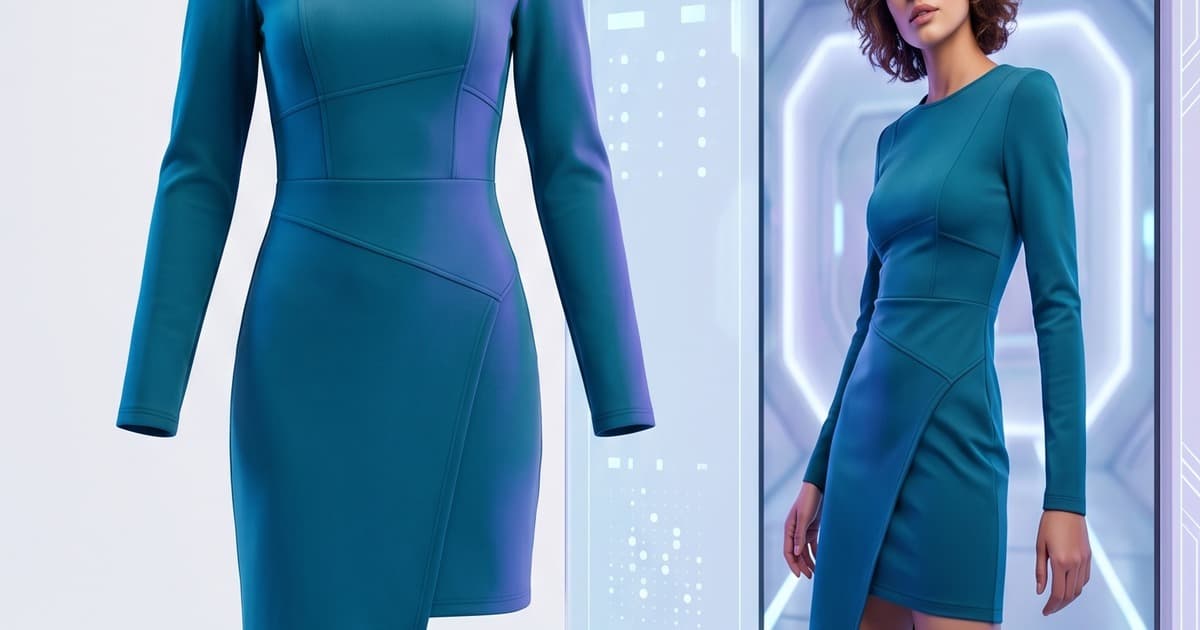
An AI product photoshoot is the process of generating photorealistic, on-model product images using AI — starting from flat-lay photographs or mannequin shots you already have.
Instead of booking a studio, hiring models, and coordinating a full production crew, you upload your existing product photography. The AI renders your garment or product worn on a photorealistic model, preserving every detail of the item — fabric texture, drape, color accuracy, stitching, print placement — in a studio-quality image.
The phrase virtual photoshoot AI captures it well: everything that used to require physical presence (studio, model, photographer, lighting crew) is now handled computationally.
Modern AI product photography, powered by diffusion models and custom-trained AI systems, produces images that routinely pass for real photography. Shoppers often can't tell the difference — because there isn't one in any way that matters.
The End-to-End Workflow: What Actually Happens
Here's what an AI photoshoot for ecommerce looks like, step by step.
Step 1: Upload Your Product Images
You don't need anything special. What you already have is enough:
- Flat-lay photography — the product laid flat on a surface, shot from above or at an angle
- Mannequin shots — the product worn on a ghost or invisible mannequin
- Hanger shots — the product on a standard clothing hanger
That's the raw material. Most fashion brands have all three. Even budget flat-lays shot in-house work as inputs — what matters is that the product itself is clearly visible.
The AI doesn't just paste your product onto a model. It analyzes the garment's structure — the drape, silhouette, fabric weight, and details — and renders how that product would actually look when worn. The physics of how a shirt falls at the shoulder or how a skirt flows at the hem gets modeled, not guessed.
Step 2: Choose Your AI Models and Settings
This is where the virtual photoshoot AI becomes a creative tool, not just a production shortcut.
You select:
- AI model — body type, height, skin tone, age presentation
- Pose — standing, seated, walking, editorial poses
- Background — clean studio white, lifestyle environments, location aesthetics
- Lighting style — product-focused studio light, soft natural light, dramatic editorial light
- Output format — full-body hero shot, cropped product detail, social media crop, catalog horizontal
For brands operating across multiple markets, this is significant. You can generate the same product worn by diverse models for different regional campaigns — without additional shoots, without additional cost. Every variant comes from the same flat-lay upload.
Step 3: Generate and Review
Image generation typically takes minutes. A catalog of 50 SKUs in three colorways each, with two model variants per SKU, can be processed in a single working session. The same volume through a traditional photoshoot would take weeks.
Output images arrive at full resolution, ready for:
- Product detail pages (PDPs)
- Catalog layouts
- Social media (Instagram, TikTok, Pinterest)
- Paid ads
- Lookbooks and seasonal campaigns
- Email marketing
No retouching queue. No post-production delay. No back-and-forth with an external editing team. What you generate is production-ready.
The Traditional Shoot: What You're Actually Replacing
To understand why AI product photography changes the economics of ecommerce content, it helps to map exactly what the traditional alternative involves.
The True Cost of a Traditional Fashion Photoshoot
A production-quality on-model photoshoot isn't a single line item. It's a stack of costs that compound:
For a mid-size brand shooting 20–40 looks in a day, the all-in cost runs $5,000 to $15,000 per shoot day. At 40 looks, that's $125–$375 per final image — before retouching.
Then there's the timeline. A typical shoot cycle — from briefing to final retouched images delivered — takes three to six weeks. For seasonal brands, that's a meaningful portion of the launch window eaten by production logistics.
The Scheduling and Logistics Problem
Beyond cost, the logistics of traditional shooting create operational drag:
- Garment shipping — samples need to arrive on time, in the right size, in undamaged condition
- Model booking — schedules shift; cancellations happen; replacement bookings cost time and money
- Crew coordination — photographer, stylist, makeup artist, and model all need to land in the same place at the same time
- Reshoot risk — if something goes wrong (wrong lighting, damaged sample, missed detail), you book again
- Post-production queue — retouching backlogs mean you're waiting days or weeks after the shoot is done
Each of these is a failure point. Any one of them can push a product launch.
The AI Alternative: What Changes
With an AI photoshoot for ecommerce, the entire logistics layer disappears. There's no scheduling. No shipping. No crew. No post-production queue. The only inputs are digital, and the outputs are ready for publication.
The cost per image at scale drops to a fraction of traditional shoot pricing — typically 80–95% cheaper once you're working across a full seasonal catalog. And the timeline collapses from weeks to hours.
Why 50+ SKUs Per Season Is the Tipping Point
Not every brand feels the pain equally. For brands with a small, stable catalog, traditional photography might still work. But once you're managing 50 or more SKUs per season, the math changes fundamentally.
The Catalog Coverage Problem
Most fashion brands can't afford to shoot every product on-model. They shoot their hero SKUs — the pieces they're pushing hardest — and let the rest live as flat-lays, knowing that flat-lays convert significantly worse than on-model images.
Research consistently shows that on-model photography outperforms flat-lays by 20–30% in conversion rate. That gap is real revenue, left on the table because traditional photography costs made full on-model coverage impossible.
With AI product photography, the unit economics flip. The cost per image stays low regardless of catalog size. A 200-SKU catalog gets the same quality on-model treatment as a 10-SKU catalog — because there's no per-day cost structure.
Multiple Colorways at No Extra Marginal Cost
Traditional photography makes colorway coverage painful. Every colorway technically needs its own shoot to show correctly on a model — different fabrics under different lighting catch color differently.
In practice, most brands shoot one colorway on-model and use flat-lays for the rest. Shoppers on the secondary colorway PDPs get an inferior experience, and conversions show it.
With an AI product photoshoot, each colorway variant is a new upload with the same fixed cost structure. A six-colorway jacket becomes six photorealistic on-model images in the same session, with consistent model, pose, and background.
Seasonal Velocity
Brands operating fast fashion, trend-driven, or drop-based release models face a particular version of this problem. Their catalog turns over rapidly — sometimes monthly. The traditional photoshoot cadence can't keep up with that velocity.
AI product photography scales with your release cadence rather than imposing its own timeline on it. When a new drop goes live, the photography can be ready on the same day the final samples are confirmed.
What AI Product Photography Preserves
The legitimate question about any AI-generated image is: does it actually look like my product?
Modern AI product photography handles garment fidelity with a level of accuracy that matches or exceeds what most ecommerce photographers deliver in studio conditions:
- Fabric texture and sheen — silk, denim, knitwear, leather, linen all render with accurate surface properties
- Structural details — stitching, seams, buttons, zippers, hardware show correctly
- Fit and silhouette — the garment's cut reads accurately; oversized pieces look oversized, fitted pieces look fitted
- Print and pattern placement — graphics, prints, and repeating patterns maintain their correct spatial relationship on the garment
- Color accuracy — colors render true to source, with correct behavior under different lighting conditions
What this means practically: the AI-generated image is a genuine representation of the product. It's not a stylized render or a CGI approximation — it's the product, rendered as it would appear in a studio photograph.
Related: See how the flat-lay to on-model workflow works in detail in our AI Photo Studio guide.
Real Use Cases: How Brands Are Using This Today
The most common deployment patterns for AI photoshoots in ecommerce right now:
Full Catalog Coverage
Brands uploading their entire seasonal catalog — typically 50–300+ SKUs — and generating on-model images for every product. PDPs go from flat-lay to on-model across the board, closing the conversion gap on products that previously had no model photography.
Model Diversification
Generating the same product across multiple AI models — different body types, skin tones, age presentations — without the cost and complexity of booking diverse model pools. This is particularly valuable for brands emphasizing inclusive sizing or serving multiple regional markets.
Rapid Iteration for Ads
Marketing teams using AI product photography to generate multiple creative variants quickly — different backgrounds, poses, and crops — for paid social testing. Instead of running one ad creative from a single shoot, they can run six variants and let performance data determine the winner.
Lookbook and Seasonal Campaign Production
Entire seasonal lookbooks assembled from AI-generated images, with consistent model, aesthetic, and lighting across the collection. The output looks like a coordinated editorial campaign — because it is one, just produced digitally.
The Ghost Mannequin Alternative — and Why It Falls Short
Many brands use ghost mannequin photography as a middle ground: cheaper than on-model, more structured than flat-lay. It works for showing garment structure, but it doesn't solve the fundamental problem.
Shoppers looking at a ghost mannequin image are still not seeing the garment worn by a person. The conversion gap between mannequin and on-model photography is narrower than flat-lay vs. on-model, but it's still significant.
More importantly, ghost mannequin photography still requires physical setup, a real mannequin, and post-production editing to remove it. It's cheaper than full on-model shoots, but it's not scalable the same way AI is — and it doesn't produce the most conversion-optimized result.
Full comparison: Ghost Mannequin Photography vs AI — the complete breakdown.
The Numbers: What Scale Actually Looks Like
Let's run the math for a real scenario.
A fashion brand with 100 SKUs per season, each shot in 3 colorways, needing 2 model images per colorway:
- Total images needed: 600
- Traditional shoot estimate: $125–$375 per image all-in = $75,000–$225,000
- Timeline: 4–8 shoot days, 4–6 weeks end-to-end for production
With AI product photography:
- Same 600 images generated from flat-lay uploads
- Cost: a fraction of traditional, typically 90%+ savings at this volume
- Timeline: hours to days, not weeks
The savings aren't marginal. They're structural — they change what's financially possible for catalog coverage, colorway photography, and campaign velocity.
And these savings compound. Every season you're running AI photography, you're reinvesting the difference into more coverage, more creative variants, or simply better margins.
What to Look for in an AI Product Photography Platform
Not all AI product photography tools are equal. When evaluating platforms for your brand, the critical questions are:
Garment fidelity — Does the AI actually preserve your product's details? Test with complex prints, textured fabrics, and garments with distinctive hardware.
Model control — Can you specify body type, skin tone, pose, and background? Or are you stuck with pre-set templates?
Output resolution — Are images production-ready for full-page PDPs and ad formats, or are they low-res previews?
Batch processing — Can you process your entire catalog efficiently, or is it one-at-a-time?
Iteration speed — How quickly can you regenerate a variant if the first output isn't right?
Integration — Does it connect to your existing content workflows (Shopify, DAM systems, etc.)?
The answer to these questions separates a genuine production tool from a novelty demo.
CTA: Run Your First AI Product Photoshoot with Tellos
Tellos AI Photo Studio is built for exactly this workflow. Upload your flat-lays or mannequin shots, select from a library of AI models, and get studio-quality on-model images back in minutes — at a cost per image that makes full catalog coverage financially viable for the first time.
For brands doing 50+ SKUs per season, the shift from traditional photography to AI product photography isn't a nice-to-have. It's a competitive advantage that compounds with every new season.
No shoot to book. No studio to rent. No six-week production cycle. Just your products, on the right models, ready to sell.