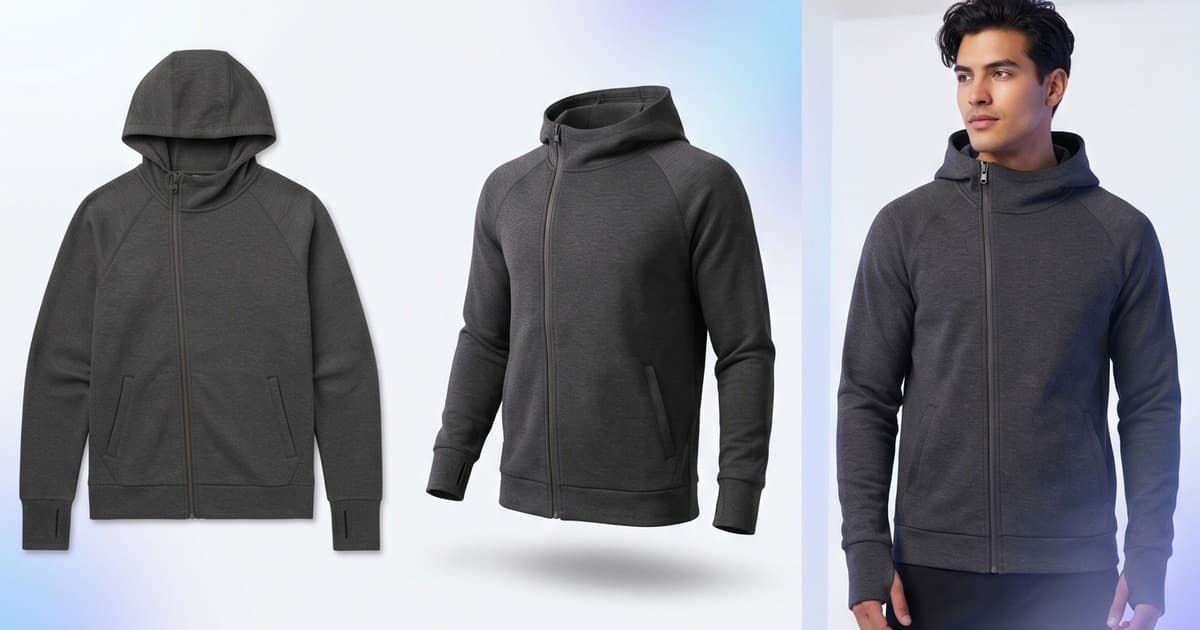
Your flat-lays are sitting in a Dropbox folder. Your ghost mannequin shots look clinical. And your next campaign launch is in three weeks — not three months.
This is the situation most clothing brands are in when they first look seriously at AI photoshoots. Not because they can't afford a traditional shoot, but because the math no longer works. One day in a studio with a photographer, model, stylist, and art director costs $3,000–$8,000 before you've edited a single frame. For a 50-SKU collection launch, that's simply unsustainable.
AI photoshoots for clothing brands flip this equation. You bring what you already have — product images you've likely already shot for sampling or supplier approval — and the AI generates professional, on-model, campaign-ready output. The question isn't whether AI photoshoots work. It's knowing what inputs give you the best results, what outputs you can realistically expect, and where brand-trained custom models leave generic AI behind.
This guide covers all of it.
What Inputs Work Best for AI Fashion Shoots
The quality of your AI photoshoot output is directly tied to the quality of your product input. Not all starting images are equal — and understanding the hierarchy helps you decide which assets to prioritize.
Flat-Lays: The Most Common Starting Point
Flat-lays are the most common input clothing brands feed into AI photoshoot tools, and for good reason: most brands already have them. Shot on white or neutral backgrounds for supplier sign-off, they show the garment clearly without distortion.
What works well:
- Clean, wrinkle-free presentation
- Sharp focus with even lighting
- Full garment visible (not cropped)
- Neutral or white background (easier to isolate)
What creates problems:
- Heavy folds or crumpling obscuring the silhouette
- Mixed or colored backgrounds that bleed into fabric edges
- Extreme angles that hide fit information
A well-shot flat-lay on white gives the AI enough information about fabric weight, print placement, and overall silhouette to generate convincing on-model output. Ghost mannequin alternatives are also worth considering as inputs.
Mannequin Shots: Higher Fidelity, Better Drape Information
If you've been doing ghost mannequin photography, you're sitting on arguably the best input format for AI photoshoots. Mannequin shots preserve dimensional information — how the fabric sits at the shoulders, how a hem falls, where a waist fits — that flat-lays can't convey.
The AI uses this structural information to reconstruct how the garment would look on a human body. The closer the mannequin proportions are to real human proportions, the more accurate the output.
Best practices for mannequin inputs:
- Use a form-fitting mannequin that matches your target fit model proportions
- Shoot at eye level, not from above
- Capture front, back, and key detail angles separately
- Keep styling consistent with how you'd wear the piece
Mannequin-to-model AI transformation has become one of the most common use cases precisely because the input quality is high.
Hanger Shots: Fast, But Lower Fidelity
Hanger shots are the entry-level input. Most brands shoot these in-house for internal cataloguing. They work, but they require more AI interpretation because hanging doesn't represent how fabric behaves on a body.
Use hanger shots when:
- You need to quickly test a concept before committing to more structured inputs
- The garment is structured enough (blazers, jackets) that hanger presentation preserves some dimensional information
- You're working with a large SKU count and don't have time to reshoot everything
For hero images — PDPs, campaign banners, lookbook pages — always prefer flat-lay or mannequin over hanger. The output quality difference is significant.
What Outputs You Can Generate From an AI Fashion Shoot
Once you've fed in your product images, here's what a modern AI photoshoot workflow can produce.
On-Model Product Images
This is the primary output. Your garment appears on a digital AI model — positioned, lit, and styled as if it came from a professional studio shoot. You can typically control:
- Model appearance — skin tone, body type, hair
- Pose — standing, walking, seated, editorial
- Background — clean studio, lifestyle setting, outdoor
- Lighting — soft natural, studio strobe, golden hour
For PDPs, most brands generate 3–5 on-model images per SKU: a front hero, a back view, a lifestyle shot, a detail close-up, and a movement or editorial pose. That's a full PDP gallery from a single product input.
Lifestyle and Editorial Images
Beyond standard PDP shots, AI photoshoots can generate contextual lifestyle images. A summer dress doesn't just get a white-background studio shot — it gets a beachside version, an outdoor café version, and a garden party version, all from the same flat-lay input.
This matters enormously for social content, where context-specific imagery outperforms generic studio shots in both engagement and conversion. AI-generated clothing photos in lifestyle contexts have shown to drive stronger engagement in social ads.
Lookbook and Campaign Compositions
With multiple SKUs, AI photoshoots can generate cohesive lookbook-style compositions: coordinating outfits styled together, consistent models across a collection, uniform editorial aesthetic across dozens of products.
Traditional lookbook production requires days of on-set shooting. AI lookbook creation compresses this into hours, with the ability to run multiple aesthetic directions in parallel.
Quality Expectations: Fabric Accuracy, Fit, and Draping
Let's be direct about what AI photoshoots currently do well and where limitations exist.
What AI Gets Right
Print and pattern placement — AI models handle prints accurately. A floral pattern, a stripe, a logo placement — these render correctly because the AI has the flat-lay as a reference. Don't expect the AI to invent pattern placement; it works from what's in your input.
Color accuracy — With clean inputs on neutral backgrounds, color reproduction is highly accurate. What you see in your product image is what you get in the output.
Overall silhouette and garment structure — Jackets, structured dresses, trousers with clear silhouettes translate well. The AI understands garment structure from the input and renders it correctly on the body.
Texture for common fabrics — Cotton, denim, linen, jersey, and knitwear all render well. The AI has seen enough of these fabrics to handle lighting interactions accurately.
Where Quality Has Nuances
Sheer and translucent fabrics — Voile, chiffon, organza — these require the AI to make assumptions about layering and skin visibility that it may not always get right from a flat-lay. Mannequin inputs help significantly here.
Complex draping — Bias-cut gowns, draped silks, asymmetric pleating — these are technically demanding because the drape changes fundamentally when on a body versus flat. Results are improving, but this is where you'll occasionally need manual correction.
Stretch and compression fabrics — Activewear, shapewear, swimwear. These fabrics behave very differently stretched on a body versus flat. AI handles this better than it used to, but complex compression garments still benefit from mannequin inputs.
Fine knits and luxury textures — Cashmere, fine merino, intricate lace. The AI renders the general texture, but ultra-fine detail may not achieve luxury goods photography standards without some post-processing.
The honest benchmark: for most mainstream clothing categories, AI photoshoot output at quality settings currently available is suitable for PDPs, social ads, and lookbooks. For hero campaign images where a human model would typically be used for a premium brand, review the output carefully and plan for occasional manual touch-up.
How Custom Brand-Trained Models Elevate Results
Generic AI photoshoot tools use base models trained on broad datasets. They work. But they don't know your brand.
Custom brand-trained AI models are a different proposition entirely. A model trained specifically on your brand's visual identity — your fit models, your typical lighting, your aesthetic references, your specific product categories — produces output that is calibrably closer to your existing creative standards.
What Custom Training Unlocks
Consistent model appearance — Instead of selecting from a generic library, your AI model is your model. Same face, body type, and skin tone across every SKU, every shoot, every season. This matters enormously for brand coherence and is something generic AI simply can't offer.
Brand-specific aesthetic — Your lighting style, your typical poses, your color grade. A custom-trained model has seen your brand's existing imagery and generates output that fits within that visual vocabulary. The result doesn't look AI-generated; it looks like your existing creative.
Fabric-specific accuracy — If your brand specializes in a particular category — technical outerwear, luxury knitwear, performance activewear — a custom model trained on your product history will handle your specific materials better than a general-purpose model.
Fit accuracy — Generic models generate plausible fit. Custom models trained on your actual garment construction and fit samples generate accurate fit that reflects your actual product. For brands where fit is a brand promise, this distinction matters.
Custom AI models for fashion brands represent the ceiling of what AI photoshoots can produce — and it's considerably higher than what most brands expect when they first encounter generic tools.
The Competitive Moat
Here's something brands don't always consider: a custom-trained model is proprietary. Your competitors can use the same generic AI tools you can. They cannot use your custom model. As AI photoshoots become standard infrastructure in fashion ecommerce, the brands with trained proprietary models will have a durable creative advantage over those relying on commodity AI.
Multi-Channel Output: One Shoot, Every Format
The biggest operational advantage of AI photoshoots isn't quality or cost — it's flexibility. A single AI shoot session generates assets for every channel simultaneously.
PDPs
Product Detail Pages need 4–6 images per SKU at minimum: hero front, back, lifestyle, detail, and model variants for different colorways. AI photoshoots generate all of these from one session. AI photo studio workflows have made full PDP galleries from flat-lays a standard production step.
Practically, this means you can launch with a complete gallery on day one instead of placeholder images while you wait for shoot delivery.
Social Content
Social platforms require different aspect ratios, different aesthetics, and different frequencies than PDPs. A single AI session can produce:
- Square and portrait crops for Instagram feed
- Vertical 9:16 compositions for Stories and Reels
- Horizontal banner formats for Facebook/Pinterest
- Multiple aesthetic directions (clean studio vs. lifestyle) for A/B testing
What would previously require multiple shoot concepts is now a single AI generation session with different prompts.
Paid Ads
Ad creative requires volume. You need multiple variants per campaign — different models, different poses, different backgrounds — to test what works. At traditional shoot costs, this kind of variant testing is reserved for performance-tier budgets. AI photoshoots make it accessible to any brand.
Run 10 creative variants for a single SKU. Kill the 8 that underperform. Scale the 2 that work. That loop, which used to take months and cost tens of thousands, now takes days.
Lookbooks and Catalogs
Seasonal lookbooks require consistent visual identity across dozens or hundreds of products. A single AI session, using consistent model settings, lighting, and background parameters, produces a cohesive catalog that looks planned and produced — because it is.
AI catalog production for full seasonal collections is one of the clearest ROI cases in fashion ecommerce right now. Compare two weeks of studio shoots at significant per-day costs versus one AI production session that generates the entire catalog.
The Real Cost Comparison
Let's put numbers to this.
| Output | Traditional Shoot | AI Photoshoot |
|---|---|---|
| Studio day rate (photographer + model + stylist) | $4,000–$8,000/day | — |
| SKUs per studio day | 15–25 | — |
| Images per SKU | 4–6 | 10–20 |
| Cost per SKU | $200–$500 | $5–$30 |
| Turnaround | 2–4 weeks | Hours–48 hrs |
| Variants for A/B | Extra shoot required | Included |
| New colorway | Full reshoot | Minutes |
For a 100-SKU catalog, traditional photography costs $20,000–$50,000 and takes a month. AI photography costs $500–$3,000 and takes a few days. The savings fund more campaigns, more variant testing, and frankly, more SKUs.
The full cost comparison breaks this down across brand sizes.
What to Expect From Your First AI Shoot
If you're running your first AI photoshoot for a clothing brand, here's a realistic timeline:
Day 1: Prepare product inputs. Clean up flat-lays or mannequin shots. Ensure clean backgrounds, full garment visibility, consistent lighting.
Day 1–2: Run initial AI generation. Select model parameters: model appearance, pose categories, background styles.
Day 2: Review output. For most mainstream garments, 70–80% of generated images will be publish-ready on first pass. Flag 20–30% for regeneration with adjusted parameters.
Day 3: Final selection and post-processing. Most teams crop to final dimensions and do light color grading to match brand standards.
Day 3–4: Export and distribute across channels. PDP upload, social scheduler, ad platform assets.
Compare this to traditional photography, which starts with 2–3 weeks of pre-production before you're even in a studio.
Choosing the Right AI Photoshoot Platform for Clothing Brands
Not all AI photoshoot tools are built for fashion. When evaluating platforms, look for:
Fashion-specific training — General image AI doesn't handle garments, drape, and fabric the way a fashion-specialized model does. Verify the platform is built explicitly for clothing and fashion.
Custom model capability — If brand consistency matters to you, you need the ability to train custom models on your specific brand aesthetic and fit standards.
Multi-format output — The platform should generate appropriate crops and formats for PDPs, social, and ads without manual resizing.
Integration with your workflow — Does it connect to your product catalog? Can you batch-process SKUs? Does output come in formats your team can use directly?
Quality review tools — You'll want to compare input vs. output side-by-side and easily flag or regenerate problem images.
The honest comparison between AI and traditional photography is worth reading before you commit to a platform.
Frequently Asked Questions
Can AI photoshoots replace all traditional photography?
For most clothing brands, AI photoshoots can handle the majority of product photography — PDPs, social content, ads, lookbooks. High-budget hero campaign imagery for flagship products may still benefit from a traditional shoot for the creative direction and nuance. Many brands run a hybrid: AI for volume, studio for hero.
How does the AI handle different colorways?
AI photoshoots excel at colorway variants. Feed in a white garment, generate on-model shots, then use color transfer to produce the same images in every colorway. What traditionally required multiple studio setups now takes minutes.
What about model diversity?
AI photoshoots let you generate the same garment on models with different appearances — different skin tones, body types, hair. Representing your actual customer base in your product imagery is now a straightforward production decision, not a logistics and casting challenge.
Will customers know the images are AI-generated?
In most cases, no. Customers don't care how the image was produced — they care whether the image clearly shows the garment, communicates fit and styling, and helps them make a purchase decision. Quality AI photoshoot output does all of this effectively.
Start Your AI Photoshoot With Tellos
If you're a clothing brand and you're still debating whether AI photoshoots are worth trying, consider this: you already have the inputs. Your flat-lays, your mannequin shots, your hanger images are sitting in folders right now.
Tellos is built specifically for ecommerce brands that need fashion-grade AI photoshoot output — on-model images, lifestyle shots, editorial compositions, and multi-channel variants — from the product images you already have. No studio booking, no model casting, no art director day rates.
Upload a garment. Select your model parameters. Get campaign-ready images in minutes.
Brands using Tellos generate full PDP galleries, social content, and ad creative from a single AI session — then iterate on new colorways, new models, and new backgrounds without touching a camera.